


Tell me if this sounds familiar. You open ChatGPT, ask it something real, and get back an answer that’s technically fine and completely useless.
Meanwhile someone in your call group swears the same tool saves them an hour a day.
Here’s the thing. That person almost certainly isn’t smarter than you and isn’t doing anything technical. They just spent ten minutes setting the thing up before they started typing, and you didn’t.
It’s not a skill gap. It’s a setup gap. And you close it once.
The whole point is to stop re-explaining yourself every single time you open a new chat. Five things, ten minutes, and then you’re done forever.
Disclaimer: While these are general suggestions, it’s important to conduct thorough research and due diligence when selecting AI tools. We do not endorse or promote any specific AI tools mentioned here. This article is for educational and informational purposes only. It is not intended to provide legal, financial, or clinical advice. Always comply with HIPAA and institutional policies. For any decisions that impact patient care or finances, consult a qualified professional.

1. Tell it who you are
Most people skip straight to the question. No context, no introduction, nothing.
That’s like grabbing a new colleague in the hallway and asking about a complicated case without mentioning you’re a physician. You’ll get an answer. It just won’t be for you.
So say who you are up front. Specialty, experience level, and what kind of answer actually helps you.
Something like:
“I’m a family medicine physician. On clinical topics, assume a medical background and skip the basics. On business and investing, I’m a beginner, so explain more.”
Write it once. Then put it somewhere the tool reads automatically, so you never type it again.
ChatGPT has a custom instructions box under personalization. Claude has an account level instructions setting, plus Projects that carry their own context, which is handy if you want your clinical research kept separate from your real estate research. Gemini does it through Gems, little custom assistants you build once and reuse.
2. Tell it how you want to be talked to
Every one of these tools has a default voice. Slightly formal, longer than you need, and weirdly in love with bullet points. If you know, you know.
That default isn’t wrong. It’s just not built for anybody in particular.
So tell it. Short and direct. Conversational. No bullets unless you ask. No summary at the end restating what it just said. However you want it to be.
This is a tiny change that makes the tool feel like a different product. If you want quick, scannable answers between patients, say that. If you’re drafting a patient handout, you want something that reads like a person wrote it, and that’s a different setting entirely.
Claude has a feature built for this called Styles, where you save a tone preset, name it something like Quick Clinical Answers, and turn it on from a menu. ChatGPT folds tone into the same custom instructions box. Gemini bakes it into each Gem.
If your tool lets you save more than one, build two. One for fast answers. One for longer writing.
3. Tell it what it can never do
This is the step almost nobody does, and it’s the one that matters most when the work has real stakes attached to it.
Before you use AI for anything touching clinical or professional work, write down what’s off limits. Not because the tool is dangerous. Because it’s a lot easier to set the boundary now than to explain an awkward situation later.
Something like:
“Never present anything you tell me as a diagnosis or a clinical recommendation. Treat it all as background I’ll verify myself. Don’t ask me for patient information, and if I start to share any, stop me.”
Put that in the same permanent spot as your personal context. Actually, put it somewhere even harder to skip. A Claude Project or a Gemini Gem built just for clinical topics, with the boundary written into the instructions, means it’s there every time you open that workspace whether you remember it or not.
One sentence usually does it. Write it before the first real conversation, not after something goes sideways.
This is also very useful when your AI is connected to other tools like your emails or schedule; tell it what it can or cannot access.
One thing worth being really clear about, though. That instruction is a guardrail for you. It isn’t legal protection. The consumer versions of these tools aren’t covered by a business associate agreement, so patient information doesn’t go in them no matter what you’ve told the AI to do.
If you want AI in an actual clinical workflow, that’s a conversation with your organization, not a setting you toggle.
4. Tell it to push back
Most people don’t know this is adjustable. It is, and it might be the most useful setting on this list.
A lot of these tools default to agreeable. They confirm. They validate. They rarely tell you your idea has a hole in it unless you specifically ask.
Which is a problem, right? A second opinion that always agrees with you isn’t a second opinion.
Try this:
“Push back when you see a flaw in my thinking. Don’t just tell me what I want to hear.”
That one line changes the character of every conversation after it. You go from a mirror to something closer to an actual sounding board.
Save it for wherever you do your serious thinking, or create it as a custom project. Reviewing a business plan, stress testing a decision, talking yourself out of a deal you’re too excited about. You probably don’t need it when you’re asking for a packing list.
5. Tell it what to remember
Some of these tools remember you between conversations. Some start from zero every time unless you’re working inside a Project or a Gem.
Knowing which one you’re in matters. Otherwise you end up either repeating your whole background daily or carrying information forward that you’d rather not.
And if you’re handling anything private, patient details most of all, check the memory and data settings before you use that tool for that kind of work. Not after.
ChatGPT keeps saved memories under settings, where you can read them, edit them, or shut the whole thing off. Claude keeps your standing preferences separate from individual Projects, so your clinical work and your business planning don’t bleed into each other. Gemini gives each Gem its own knowledge, so what you tell one doesn’t show up in another.
Then go back every few months and clear it out. Old context sticks around. The job you left, the deal that died, the project you finished. It’s all still in there quietly shaping your answers.
You can even surprise yourself by asking your AI how deep it knows about you. Weird, but you’ll get an idea of how much it learns by what you give it.
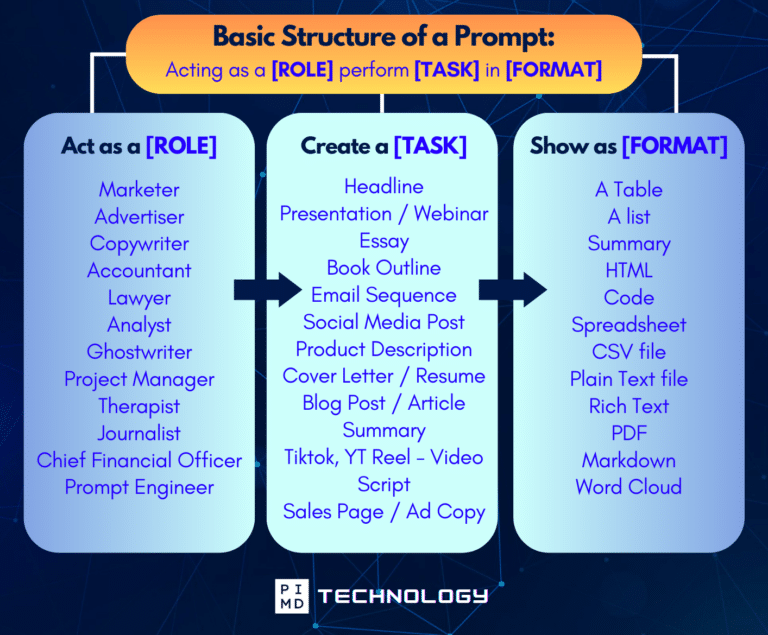
Unlock the Full Power of ChatGPT With This Copy-and-Paste Prompt Formula!
Download the Complete ChatGPT Cheat Sheet! Your go-to guide to writing better, faster prompts in seconds. Whether you’re crafting emails, social posts, or presentations, just follow the formula to get results instantly.
Save time. Get clarity. Create smarter.
The shortcut nobody uses
You don’t have to do any of that manually.
You can hand the entire job to the AI itself. Paste in one prompt and let it interview you:
“I want to set you up properly before we start working together. Ask me one question at a time to figure out who I am professionally, how I want answers formatted, what topics you should never treat as advice, how much you should challenge my thinking, and what you should or shouldn’t remember. Once you have my answers, write out the full instruction set I should save.”
That turns the whole setup into a short conversation. It asks, you answer in plain language, and it hands you a finished block of text to paste into your settings. No hunting through menus wondering which one you’re supposed to open first.
Takes about five minutes.
All three of the big platforms give you somewhere permanent to keep the result. They just call it different things. Custom instructions, a Project with a Style, a Gem. The names change. The five things don’t.
Five minutes now, or five minutes over and over in every conversation for the rest of the year. Your call.
So what’s the one thing you’d want your AI to know about you before it ever answers a question? We’d love to hear it. Let us know in the comments!
Download The Physician’s Starter Guide to AI – a free, easy-to-digest resource that walks you through smart ways to integrate tools like ChatGPT into your professional and personal life. Whether you’re AI-curious or already experimenting, this guide will save you time, stress, and maybe even a little sanity.
Want more tips to sharpen your AI skills? Subscribe to our newsletter for exclusive insights and practical advice. You’ll also get access to our free AI resource page, packed with AI tools and tutorials to help you have more in life outside of medicine. Let’s make life easier, one prompt at a time. Make it happen!
