Introduction to Online Course Platforms
In recent years, online course platforms have emerged as vital components of the digital learning ecosystem. These platforms provide educators and learners with the tools necessary to create, share, and consume educational content in a flexible and accessible manner. With the rise of remote learning, the significance of these platforms has only amplified, making it essential to choose the right one that aligns with specific educational goals.
When selecting an online course platform, several factors must be considered. Firstly, the user interface is crucial; it should be intuitive for both instructors and learners to navigate seamlessly. Furthermore, the range of features offered—such as multimedia support, assessments, and communication tools—can significantly impact the effectiveness of the course. Additionally, scalability is an important consideration, especially for those looking to expand their reach and accommodate a growing number of students.
Moreover, pricing models vary widely among platforms, with some offering subscription-based access while others charge per course. Evaluating what these costs entail, in terms of available features and ongoing support, is essential for making an informed decision. Customer support and resources provided by the platform can also play an important role, as responsive assistance can enhance both the teaching and learning experience.
Having navigated the myriad of options in this landscape, I have successfully launched my own online course, which illustrates the potential these platforms hold for educators. My experience serves as a testament to the transformative ability of the right online course platform. By utilizing the appropriate tools, I was able to effectively engage learners and deliver high-quality educational content, reaffirming the value of these platforms.
The Journey of Creating a Successful Course
Creating an online course, particularly one focused on a niche such as blogging, has been a transformative journey for me. The inception of my course, ‘Blog Growth Engine’, stemmed from a deep-seated passion for content creation and a desire to share my knowledge with others. However, the road to success was fraught with challenges, each serving as a valuable learning experience.
Initially, the most significant hurdle was the overwhelming amount of information available. Navigating through countless resources made it difficult to identify what was genuinely useful. To combat this, extensive research became essential. I dedicated hours to studying successful course creators, understanding their strategies, and applying those insights to the design of ‘Blog Growth Engine’. This diligent research allowed me to develop a course structure that resonated with potential learners.
Another challenge was balancing comprehensive content with learner engagement. I realized early on that merely providing information was insufficient; I needed to ensure that the course was interactive and engaging. This led me to incorporate various elements such as quizzes, practical assignments, and community discussions to foster an immersive learning environment.
As the course started taking shape, I leveraged marketing strategies to promote it effectively. Utilizing social media platforms and email marketing played a significant role in generating interest and drawing in potential students. According to analytics collected after launching the course, within the first six months, ‘Blog Growth Engine’ attracted over 500 students, leading to a staggering completion rate of 85% – a testament to the course’s effectiveness.
Ultimately, persistence and adaptability were key. The numerous trials I faced allowed me to hone my skills and refine the course content. The satisfaction of seeing students successfully apply the concepts learned and grow their blogs affirmed that the journey, though challenging, was undeniably rewarding.
Understanding Your Course Needs
When selecting an online course platform, the first step is to thoroughly assess your specific needs. Understanding what you aim to achieve with your course is essential. Begin by defining your objectives—are you looking to sell your course, provide free content, or use it for internal training within your organization? Each objective will shape the features you need from a platform.
Next, consider your target audience. Identifying who will be taking the course is critical in making your selection. For instance, if you are targeting professionals looking for advanced training, you may require a platform that supports sophisticated assessment tools and integrates with other resources. Conversely, if your audience consists of beginners, a user-friendly interface with clear instructions and high levels of support may be more important.
Furthermore, examine your preferred content delivery methods. Are you planning to offer live sessions, record videos, or require a system to support interactive elements such as quizzes or forums? Certain platforms are better suited to specific formats, such as video lectures versus written content. Therefore, your choice should align with how you wish to deliver your content effectively.
Additionally, consider the scalability of the platform. As your course evolves, your needs may change; ensure that the platform can accommodate growth, whether in terms of user numbers, additional courses, or enhanced features. Evaluating integration capabilities with existing tools and software you use in your business will also be beneficial.
In summary, a well-rounded understanding of your course needs, including objectives, target audience, content type, and platform scalability, will guide you effectively towards choosing the most suitable online course platform.
Evaluating Different Course Platforms
When considering the array of online course platforms available, it is essential to evaluate key criteria that will best meet your educational needs. Understanding these criteria can serve as a framework to identify a platform that is suitable for your specific requirements.
First and foremost, ease of use is paramount. A user-friendly interface ensures that both instructors and students can navigate the platform efficiently. This includes aspects like intuitive design, clear pathways for course creation, and straightforward access for learners. The learning curve for instructors should be minimal, enabling them to focus on content creation rather than technical challenges.
Cost is another significant factor. Different platforms offer various pricing structures, including subscription models, one-time fees, or even revenue-sharing frameworks. It is crucial to consider not just the initial cost but also potential additional fees for features, storage, or support. Evaluating the value you receive in relation to your budget will help in making an informed decision.
Alongside cost, assess the features offered by each platform. Essential features may include video hosting capabilities, quiz and assessment tools, course analytics, and compatibility with multimedia content. Beyond the basics, look for advanced functionalities such as gamification, community features, and mobile optimization which can enhance the learning experience.
Integrations with other tools are also vital, especially if you are already using certain educational technologies or customer relationship management (CRM) systems. A robust platform should integrate seamlessly with various third-party applications to streamline administrative functions and enhance instructional efficiency.
Furthermore, customer support can greatly influence your experience. Instructors may encounter technical difficulties and having access to reliable support can minimize disruptions. Look for platforms that offer comprehensive help, including live chat, email support, and extensive documentation or tutorials.
Finally, consider scalability, especially if you plan to grow your course offerings. A good platform should facilitate easy upgrades and accommodate increasing numbers of students without compromising performance.
Before settling on a particular online course platform, it is highly recommended to test multiple options. Most platforms offer free trials or demos, allowing you to evaluate usability, features, and overall fit for your educational goals. By taking the time to test your options, you can ensure that you select a platform that truly aligns with your needs.
My Top Picks for Online Course Platforms
As the online education landscape continues to expand, selecting the best online course platform can significantly impact both educators and learners. Here are my top picks, each catering to distinct user needs.
1. Thinkific: Frequently regarded as the best overall online course platform, Thinkific provides an intuitive interface for course creators, enabling them to design, market, and sell courses with relative ease. Its flexible pricing plans and no transaction fees make it appealing for both newcomers and seasoned educators. The platform’s robust marketing tools, such as email integrations, help enhance visibility and sales.
2. Teachable: Teachable specializes in turning expertise into revenue with its user-friendly course builder. Instructors can create multimedia courses while enjoying features like course compliance and sales page customization. Its powerful affiliate marketing capabilities also allow course creators to expand their audience reach through partnership incentives.
3. Kajabi: For those seeking an all-in-one solution, Kajabi excels with its holistic approach to online course creation. This platform integrates not just course hosting but also tools for email marketing, sales funnels, and membership management. Although it has a higher price point, its comprehensive features justify the investment for serious course creators aiming to build an online business.
4. Udemy: As one of the largest online learning platforms, Udemy offers a massive audience for course developers. It is particularly beneficial for beginners looking to share knowledge without upfront costs. However, while it allows for creative freedom, course creators must adhere to Udemy’s pricing guidelines and promotional strategies.
5. Podia: Podia stands out due to its focus on digital products beyond courses, such as memberships and storefronts. For educators invested in creating a community around their content, Podia’s features are tailored to provide seamless live chat and community interaction, enriching the user experience.
These platforms cater to a variety of needs, ensuring that there is a fit for everyone, whether they are looking to teach, learn, or engage in a combination of both.
Success Stories: Real Experience with Platforms
Throughout my journey in creating online courses, I discovered Thinkific, an online course platform that proved instrumental in achieving my educational goals. Initially, I was overwhelmed by the myriad of options available for course development. However, Thinkific stood out due to its user-friendly interface and comprehensive features tailored for online educators.
One of the critical challenges I faced was structuring my courses effectively. With Thinkific’s modular design, I was able to break down complex topics into easily digestible lessons. For instance, while developing a course on digital marketing, I utilized Thinkific to create step-by-step modules that guided students through intricate concepts, enhancing their understanding and retention of information.
Moreover, the platform’s built-in analytics significantly contributed to improving my course offerings. By leveraging the insights provided by Thinkific, I was able to identify which sections of my courses engaged students the most and which needed adjustment. This invaluable feedback loop allowed me to refine my content continuously, resulting in a noticeable increase in student engagement and satisfaction.
Another aspect that helped elevate my success was Thinkific’s marketing tools. I was able to create landing pages and promotional campaigns without needing extensive technical knowledge. An anecdote that stands out occurred during a seasonal discount campaign when I integrated Thinkific’s promotional features. I witnessed a 40% increase in enrollment, demonstrating how effectively the platform can help you reach larger audiences.
In essence, Thinkific has not only facilitated the creation of my courses but also served as a catalyst for my growth as an online educator. The platform’s robust features, coupled with continuous support, enabled me to overcome challenges and successfully build a thriving educational business.
Common Pitfalls When Choosing a Platform
Selecting the right online course platform is a critical decision that can significantly affect the success of a course creator’s offerings. However, many instructors unintentionally fall into common pitfalls during this selection process. Identifying and understanding these mistakes can help course creators avoid missteps and set a strong foundation for their online courses.
One of the most frequent misconceptions is the assumption that a higher price equates to better quality. While it is essential to evaluate the platform’s features, functionality, and user support, settling solely based on cost can lead to disappointment. Many affordable platforms offer robust features suitable for new educators, making it imperative to assess functionalities in relation to specific needs rather than merely opting for expensive options.
Another common error is failing to consider scalability. Course creators often choose a platform that meets their current needs without anticipating future growth. A platform may seem sufficient when starting, but as enrollment increases or more content is added, limitations may become apparent. Opting for a scalable solution ensures that the platform can support future developments without requiring a costly transition later on.
Additionally, ignoring user experience—both for the instructor and the learner—can negatively impact engagement and retention rates. Platforms with a complicated interface may deter learners from completing courses, thereby reflecting poorly on the instructor and their content. A thorough evaluation of the user interface and testing available demos can offer valuable insights into the overall experience.
Lastly, not prioritizing integration capabilities with other tools (such as email marketing, payment gateways, or analytics) is another oversight. A seamless integration can optimize workflows and improve the efficiency of managing courses. By being aware of these common pitfalls, course creators can make informed decisions, ultimately enhancing their online education offerings.
Cost Considerations: Budgeting for Success
When selecting an online course platform, understanding the various cost implications is crucial for effective budgeting. Each platform typically offers a range of pricing models, which can significantly impact both upfront and ongoing expenses. Common pricing structures include subscription fees, one-time payments, and commission-based models where a percentage of course sales is deducted by the platform. Depending on your chosen model, costs can vary widely, making it essential to evaluate what fits best with your goals.
Subscription-based platforms may charge monthly or annual fees that provide unlimited access to features. Conversely, a one-time purchase may seem appealing; however, it could limit access to updates and new functionalities. Commission-based platforms might seem convenient as they often have lower initial costs, but high sales volume could lead to substantial fees. Therefore, it is important to analyze your projected sales and to calculate the long-term costs associated with each platform type.
In addition to these primary costs, potential hidden fees may arise, including transaction fees, promotional expenses, and costs for additional features such as advanced analytics or marketing tools. To ensure that you are fully prepared, assess every potential expense associated with your chosen platform. Establishing a budget that incorporates initial launch costs and ongoing maintenance expenses will help in managing funds effectively.
To budget effectively for launching and maintaining your online course, begin by determining all foreseeable costs, including marketing and promotional efforts. Next, create a plan to track expenses and monitor your budget regularly. Setting aside a contingency fund can also provide a safety net against unexpected costs. By being proactive in your financial planning, you enhance your chances of creating a successful online course while staying within your budgetary constraints.
Conclusion
Choosing the right online course platform is a critical decision for both course creators and learners. Throughout this discussion, we have examined various factors that should be considered in making this choice, such as user experience, features, customization options, pricing, and support services. Each of these elements plays a significant role in determining the platform’s suitability for your specific needs and goals.
Firstly, user experience is paramount; an intuitive interface can make a substantial difference in how learners interact with your content. Features such as assessments, multimedia integrations, and community forums enrich the learning experience, facilitating better engagement and retention of knowledge. Customization options are equally important, allowing course creators to align the platform with their branding and to tailor the learning journey as per individual student requirements.
Furthermore, pricing structures should align with your budget while also reflecting the value offered by the platform. A thorough evaluation of the support services available to you can also enhance your course’s success rate. Issues may arise while delivering online courses, and a responsive support team can aid in resolving concerns promptly.
In light of these points, it becomes evident that the platform you choose can significantly impact the effectiveness of the course you create and its reception in the online education market. This decision warrants careful consideration, so take the necessary time to research and assess the options before you. By choosing a platform that meets your unique requirements, you set the stage for success in your online teaching endeavors, ultimately leading to a more productive and enriching learning experience for your students.
HOW I MADE 2.5 MILLION DOLLARS BLOGGING
Want to find the best online course platform for you?
One of my online courses (Blog Growth Engine) has 4,200+ students enrolled and makes about $3 million a year.
My course business also has over 20 employees from all marketing, tech, and software backgrounds.
To reach these numbers, we spent hundreds of hours (and thousands of dollars) using different course platforms.
Here’s what I learned: Finding the right platform isn’t always easy.
Some platforms promise the world and don’t deliver. Some are just average at best.
However, there are a few online course platforms that really stand out.
And that’s exactly what I’ll share in this article.
By the way, the platform I used to host all my courses today is one I mention below. Curious to know which?
Keep on reading!
Note: We test and review software products based on an independent, multi-point methodology. If you use our links to purchase something, we may earn a commission.
What Are the Best Online Course Platforms?
Here are my top picks for the best online course platforms this year.
1. Thinkific.
Best Overall Online Course Platform

Adam’s Take
I love Thinkific and used it for my online business, selling my course Blog Growth Engine. They provide an excellent student experience, easy integrations with Stripe and checkout providers to make collecting payments easy, and they have an expert support team that’s been super helpful. Overall, I recommend Thinkific wholeheartedly as my #1 recommendation for selling online courses.
9.3out of 10
Best For
Everyone
Price
Free – $162/month
Annual Discount
Yes – Save 20%
Promotion
Thinkific is the best overall platform to sell online courses.
It’s my #1 choice because the pricing is precisely in line with other affordable options on this list, and it can deliver a high-end course experience.
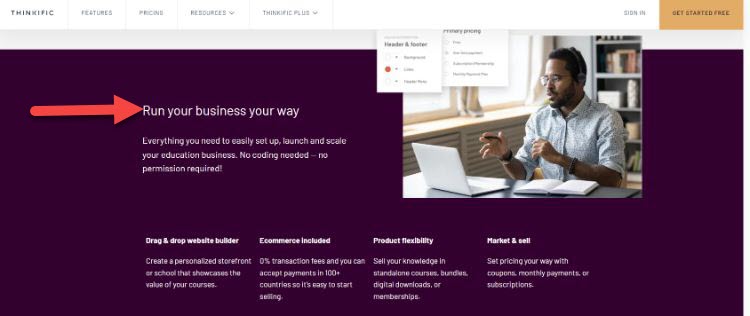
- Course websites can be customized, and you’d never guess they were Thinkific.
- Sales pages are highly optimized and look great.
- Student dashboards look nice and are customizable (you can add videos, text, and any downloadable file type to the same page).
- You can send your entire course at once or drip it out over time.
- Free Wistia video hosting (an immense value).
Here’s another take.
“Thinkific literally has everything you need right out of the box, and the trial experience is probably the easiest I’ve come across,” said Andrew McGuire, President of Income Growth Engine and Former VP of Pipeline at Armorblox.
“I was able to upload about five course videos within a few minutes of launching my trial, which is really helpful to beginners.”
Now, even though Thinkific plans start at just $40/month, even huge brands like Fiverr use Thinkific to sell online courses.
I would have never guessed that this massive learning database was a Thinkific site until their team told me:
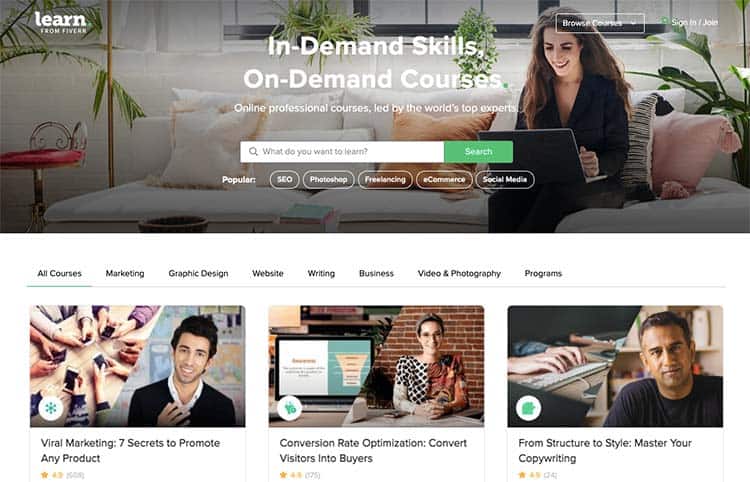
Their best (and most popular) Pro Plan offers a one-month free trial to get started.
First, this plan gives you the ability to create unlimited courses. It also features memberships and bundles, advanced pricing options, landing pages, certificates, and marketing tools.
Here’s a little preview of the experience of creating a Thinkific course.
All that you do is create and customize your course with their drag-and-drop editor:
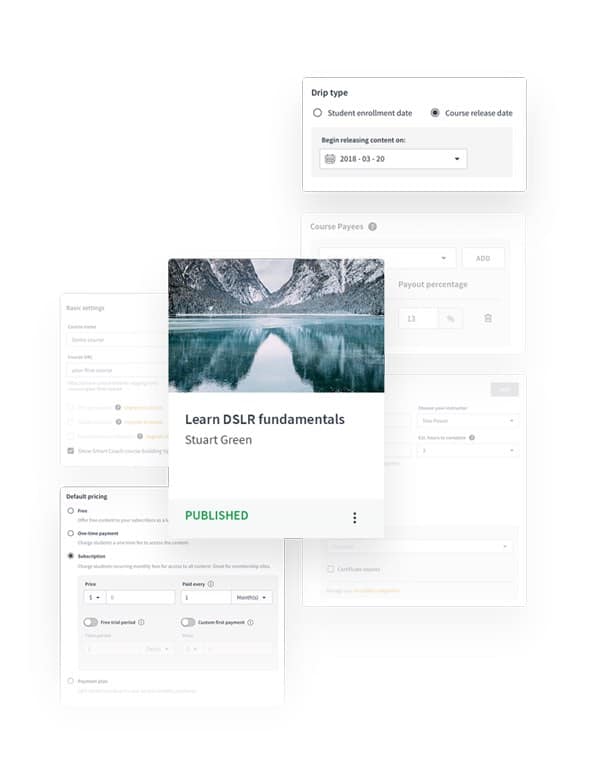
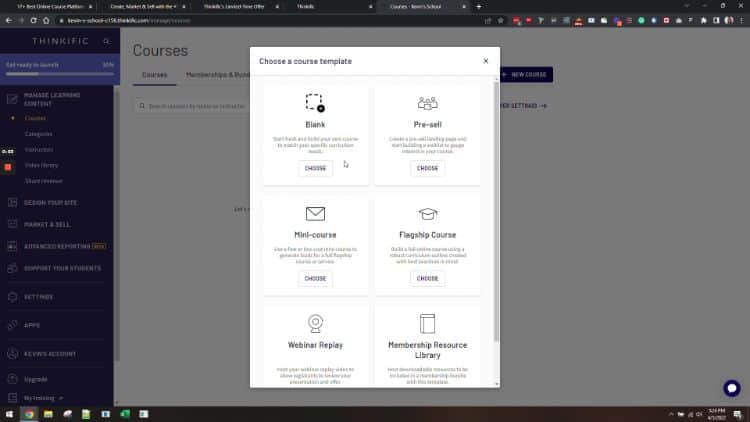
Next, you upload your content and choose one of their website templates:
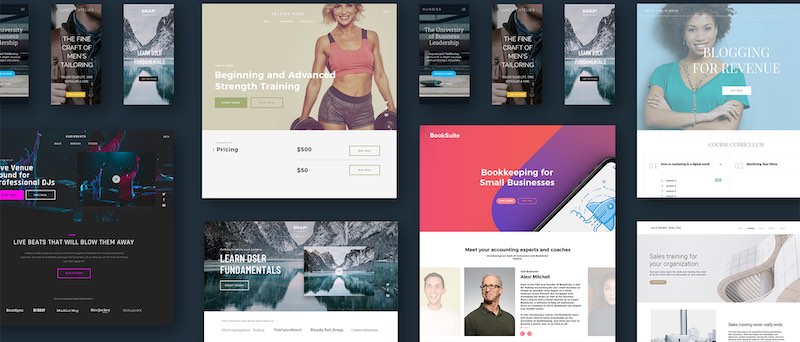
Lastly, you set up payment methods (you can collect payments in over 100 currencies):
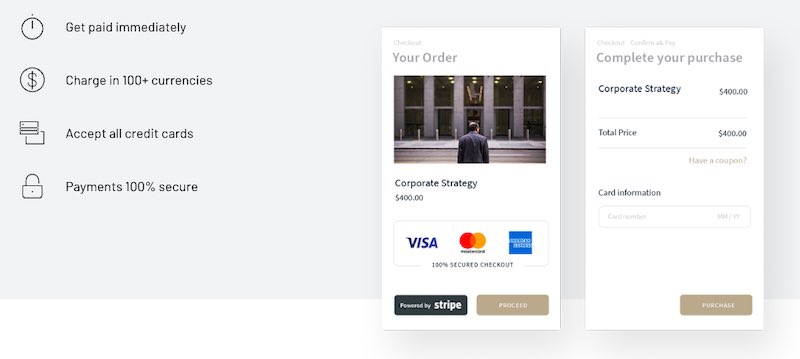
There are also a ton of customization options. If you want to build a completely custom site, their onboarding team takes your vision and helps you turn it into a reality.
Here’s what people are saying about Thinkific:
- “You need to get on Thinkific. The team is creative, reliable, and offers unbeatable support. They always make sure all my bases are covered and, as a business owner, that’s invaluable.” – Lewis Howes.
- “We’ve grown ours by teaching our audience how to scale and grow their business through online training. We couldn’t have done it without Thinkific.” – John Lee Dumas, Entrepreneurs on Fire.
- “I seriously can’t be more impressed with your customer support team. They are the perfect blend of efficient and personable. It’s like having my very own IT department.” – Kim Garnett.
Key Features:
- Live Lessons & Cohorts: Think teaching is just about pre-recorded videos? Think again! Dive into the world of real-time education, where you can connect with eager learners. It’s like hosting a global classroom right from your living room!
- Advanced Customizations: Want your course to stand out? Their advanced customization tools let you unleash your inner desiger. No coding required – just pure, unadulterated creativity!
- Website Themes: Worried about your web design skills (or lack thereof)? Fear not! Their website themes make it so a few clicks, and voila!
- Communities & Memberships: Learning doesn’t have to be a lonely journey. Create a bustling hub where your students can chat, collaborate, and maybe even make some lifelong friends.
- Progress Tracking: Ever wished you had X-ray vision to see into your students’ minds? Well, their progress tracking is the next best thing! Keep tabs on your learners’ journeys and swoop in like an educational superhero when they need a boost.
- Assessments & Certificates: Let your students show off! With this platform’s assessments and certificates, students can prove they’ve got the goods and wear their achievements like a digital badge of honor.
User Interface:
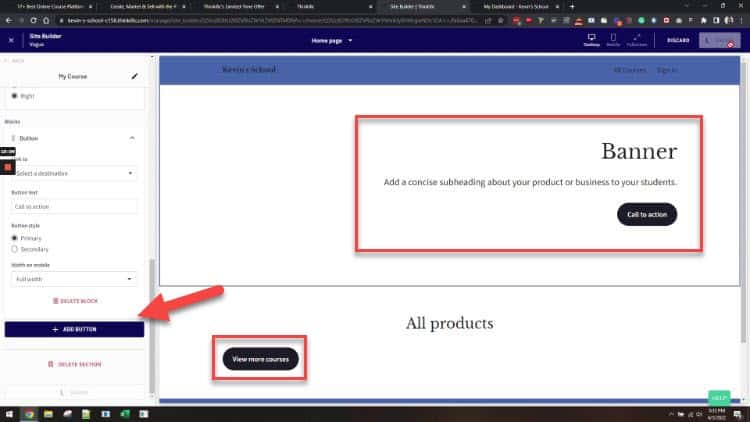
Configuring your course landing page is one of the many benefits of using Thinkific.
You can use their built-in landing page editor to easily customize the look and feel of your page without having to know any code!
There’s also a wide range of course templates that you can choose from, so you can find one that fits the style of your course.
From pre-selling your course to creating a mini-course, hosting a webinar reply, and more, Thinkific has you covered.
Thinkific Pricing:
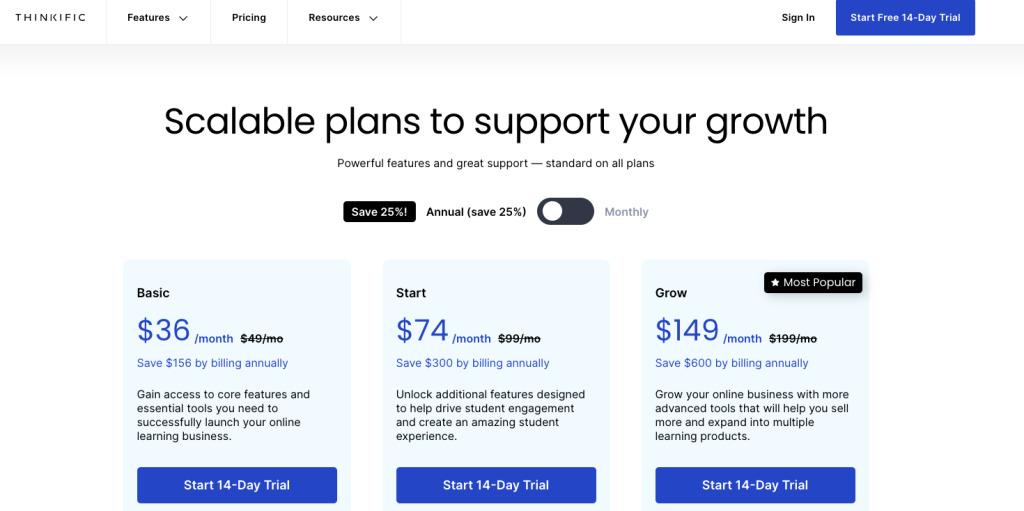
- Free ($0/month): Great to test out the features and get a feel for the interface.
- Basic ($36/month): Unlimited courses and students, 1 administrator, drip (scheduled) content, custom domain, email integrations, and coupons.
- Start ($74/month): Basic features, 1 administrator, plus memberships and bundles, private courses, certificates, advanced HTML and CSS editing, assignments, live lessons via Zoom, and priority support.
- Grow ($149/month): Pro features, plus 3 administrators, onboarding package, and unlimited growth package (best for big teams).
What I Like/Dislike About Thinkific:
Like:
- Marketing automation and email features.
- Simple free plan to get started.
- You can fully edit the code of your course site.
- Customizable course certificates.
- Custom domains.
- Affiliate marketing help and reporting.
Dislike:
- There’s a slight learning curve to the setup.
- Integration with social media networks and CRMs would be a nice touch.
Product Updates:
- Thinkific Payments allows you to have a faster performance checkout page, reducing the dropoff rate. This means that you can keep more of your hard-earned money!
- Integrated order bumps functionality means that the average order value on your Thinkific site can be increased by offering a small add-on product at checkout.
Overall, I recommend the Thinkific platform as my #1 choice for course creators and entrepreneurs who are serious about creating, marketing, and selling their own course content.
With my link below, you can get started today with a one-month free trial of their Pro Plan.
2. Kajabi.
Best High-End Online Course Platform for Professionals

Adam’s Take
Kajabi is one of the best platforms for professionals wanting to scale their businesses. With so many features in their plans, you can develop your online training just as you want and build as many features within your platform as needed. Whether you want to send newsletters, host podcasts, or build membership sites, Kajabi can work for your needs.
8.8out of 10
Best For
Professionals
Price
$55-$319/mo
Annual Discount
Yes – Save 20%
Promotion
Kajabi is the best high-end course builder tailored toward information business, not tiny course creators.
It’s best when it comes to email marketing automation. Automation is a crucial component of pre-sale, pre-webinar, drip course, and upsell emails – and Kajabi does it best.
Their “Pipelines” feature lets you create fully-automated marketing campaigns and funnels.
These are pre-built frameworks for lead generation, with pre-written copy optimized for conversions.
It also features powerful course site themes, the ability to sell digital products, a customizable checkout, and blogging functionality.
Overall, it’s the best high-end course platform with more built-in tools and features, but it costs a little more than others on the list.
Key Features:
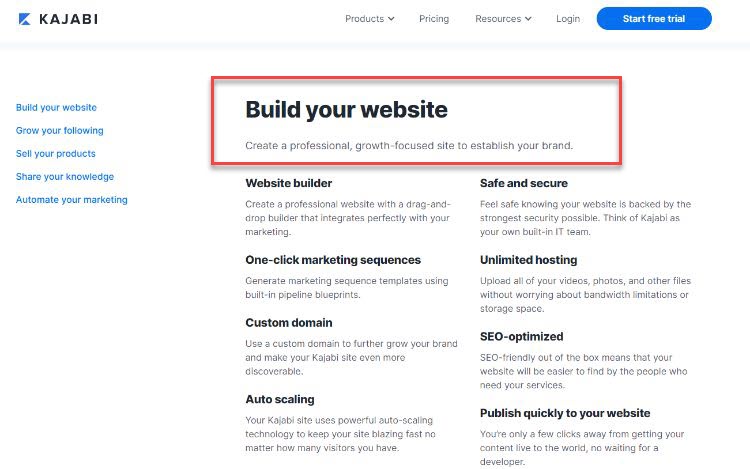
- Course Insights: Ever wondered what’s going on in your students’ heads? This feature gives you a peek behind the curtain, showing you how your learners are progressing.
- Unlimited Video Hosting: Got a lot to teach? No worries! You can create and host as many video courses as your heart desires.
- Quick Publishing: Ready to share your knowledge with the world? With just a few clicks, your course goes live. No need to wrestle with code – it’s smooth sailing all the way.
- SEO-Optimized: Want your courses to be the popular kids on the search engine block? This platform’s got you covered, helping your content climb those search result rankings.
- Unlimited Hosting: From classes to marketing materials, there’s room for it all. It’s like having a digital storage unit that never runs out of space.
- Safe and Secure: Rest easy knowing your data is locked up tighter than Fort Knox. Your information is treated like the treasure it is.
- One-Click Marketing: Promoting your courses doesn’t have to be a headache. With one-click marketing sequences, you can spread the word without breaking a sweat.
- Website Builder: No design degree? No problem! Create professional-looking website in minutes. It’s like having a personal web designer in your pocket.
User Experience:
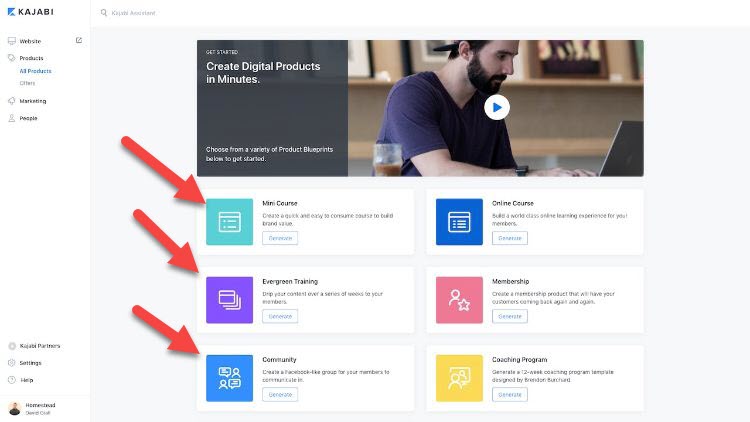
Kajabi is quite intuitive with where you have to click.
You can follow the instructions to create mini-courses and evergreen training, build your community, set up your membership site, and much more.
This makes it easy for new users to get started with the platform.
However, one downside is that the interface can be a bit overwhelming with all the available options and features.
This might take some time to get used to if you are new to using Kajabi.
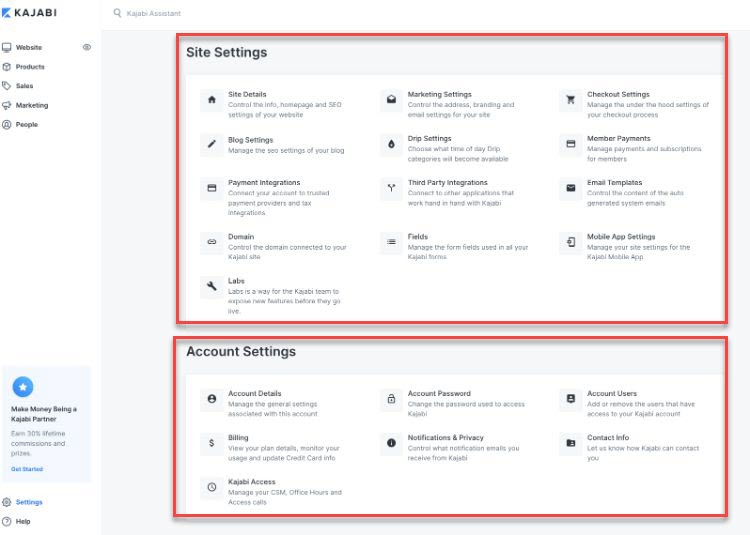
I also like that the settings are grouped in various groups, allowing easy access to just the right options when you need to change something.
Kajabi Pricing:
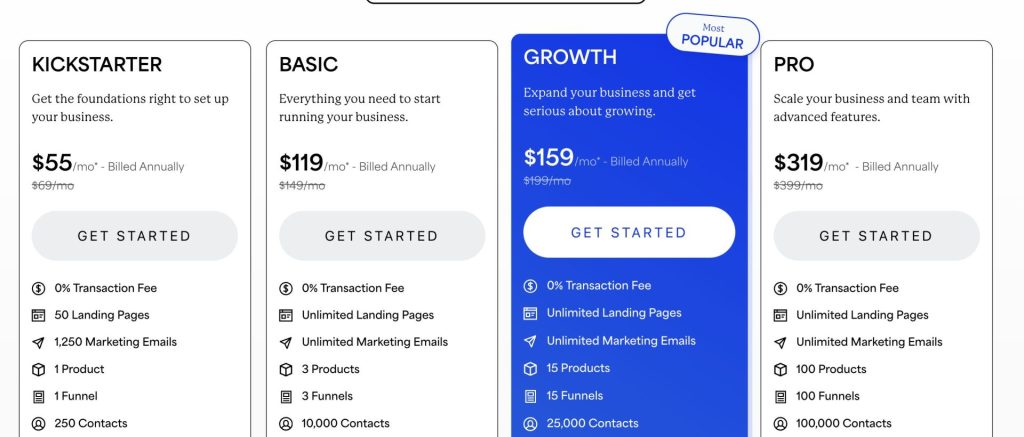
Kajabi pricing is mainly based on the number of courses and active members you have:
- Kickstarter ($55/month): Up to 50 landing pages and 1250 marketing emails.
- Basic ($119/month): 1 website, 1 admin, 3 products, 3 pipelines, 10,000 contacts, and 1,000 active members.
- Growth ($159/month): 1 website, 10 admins, 15 products, 15 pipelines, 25,000 contacts, 10,000 active members.
- Pro ($319/month): 3 websites, 25 admins, 100 products, 100 pipelines, 100,000 contacts, and 20,000 active members.
What I Like/Dislike About Kajabi:
Like:
- Best all-in-one software for a proper information business.
- Wistia video hosting is excellent.
- Primary focus on sales and marketing tools.
- More built-in tools than other platforms.
- Can offer monthly recurring subscriptions.
- Integrated with Stripe and PayPal.
- Big names use Kajabi, including Amy Porterfield.
Dislike:
- Email sequences can be more varied.
- Some improvement on the landing page builder would be welcomed.
Product Updates:
- Carousel modules in the Kajabi website builder mean you can quickly and easily create a responsive website on any device.
- Kajabi University got a new look and feel, so it’s even easier to learn and use Kajabi.
- The user experience of Kajabi payments was revamped, making it super simple to accept payments and manage your finances.
Where Kajabi excels is in its marketing automation tools.
You can segment users in your list, send emails at specific times based on advanced triggers, and send professionally branded messages.
If you’re an established business and want to try one of the more advanced platforms on the market, Kajabi is a solid choice.
Start your free 14-day trial of Kajabi today.
3. LearnWorlds.
Best AI-Powered LMS for Students.

Adam’s Take
I think LearnWorlds is one of the best course platforms for interactivity. If you’re looking to give your students an engaging course with quizzes, interactive videos, surveys, and certificates, LearnWorlds is a good choice. While it doesn’t have the ease of use of Thinkific, it does have stronger student community features and lots of new AI features.
8.5out of 10
Best For
Interactive Learning
Price
$24-249/month
Annual Discount
Yes – Save 20%
Promotion
LearnWorlds is a platform that’s best for course creators looking to interact in unique ways with their students.
Think quizzes, gamification, interactive videos, etc.
While the student experience isn’t as nice looking as a Thinkific course, it’s unique in that it offers students more interactive eLearning content.
Key Features:
- Comprehensive Support: Stuck on something? The Learnworlds team has your back. From walkthrough videos to live chat, it’s like having a friendly tech wizard on speed dial.
- Mobile App Builder: Want your courses to fit in students’ pockets? Easily create a mobile app and let your learners take your wisdom on the go. Learning doesn’t have to stop at the desktop!
- Learning Community: Turn your course into a knowledge hub. Students can connect, share ideas, and learn together. It’s like creating your own mini social network for learning!
- Synchronized Transcript: Keep your finger on the pulse of your course. This feature lets you track who’s doing what and where.
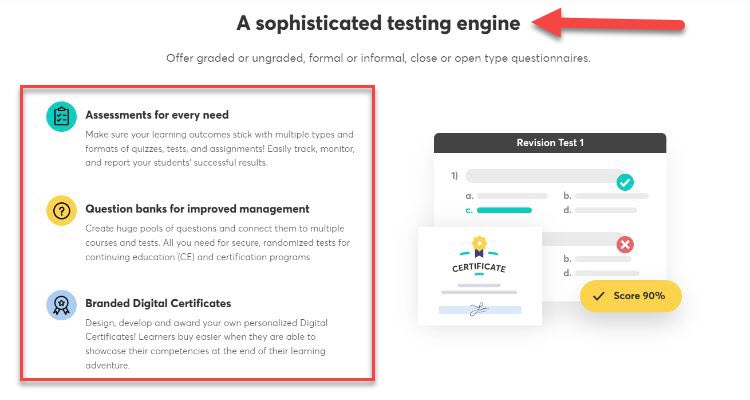
- Branded Digital Certificates: Give your students something to brag about. These certificates aren’t just proof of completion – they’re digital trophies your learners can proudly display.
- Versatile Assessments: Measure understanding in ways that fit your teaching style and keep your students on their toes.
User Experience:
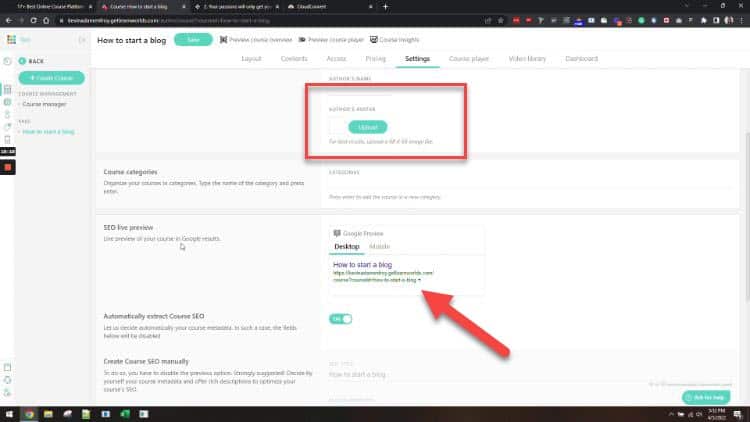
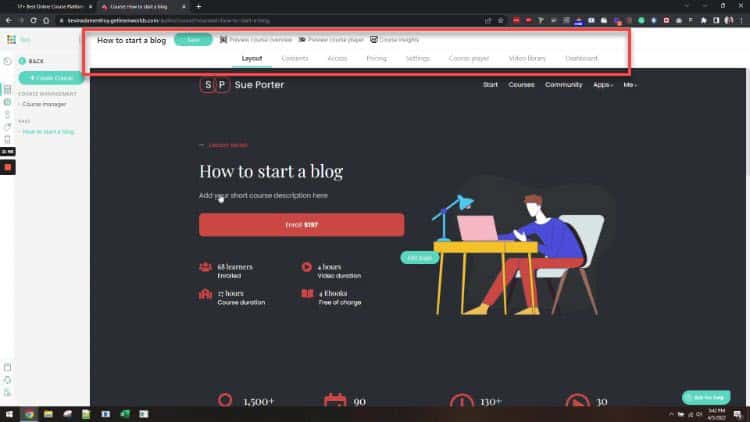
Customization is a great component of Learnworlds.
As soon as you start creating your course, you realize that the templates that are in place are easy to follow and you can quickly edit them to match your branding or the look of your website.
There’s also a focus on SEO, allowing you to optimize your courses for search engines so people can easily find them.
While it took some time to find a way to add media to specific lessons, once that was figured out it was a smooth process.
Pricing:
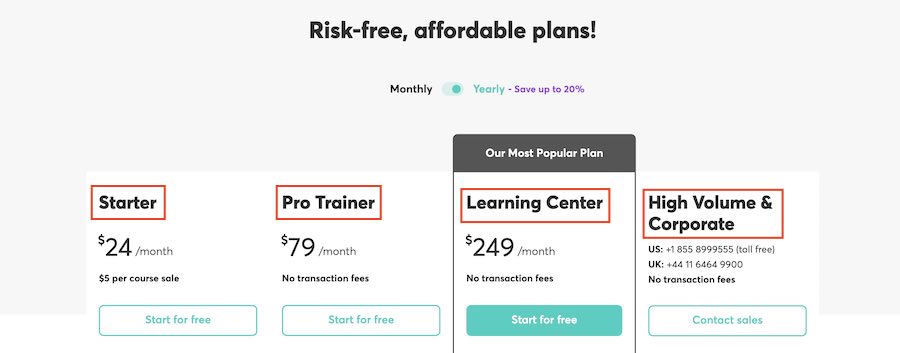
- Starter ($24/month paid annually): one admin, $5 fee per course sale, custom domain, unlimited courses, page builder tool, 4 payment gateways, coupons, and drip feed courses.
- Pro Trainer ($79/month): Starter features, plus no transaction fees, 5 admin accounts, subscriptions and memberships, custom checkout pages, live classes via Zoom and Webex, assignments, and affiliate management.
- Learning Center ($249/month): Pro Trainer features, plus a branded corporate academy, premium cloud servers, flexible invoicing, premium support, and a premium account manager.
What I Like/Dislike About Learnworlds:
Like:
- Interactive videos, e-books, gamification, and downloadable attachments.
- You can offer free courses.
- You can extract transcripts from your courses.
- A custom domain name and white-labeled content.
- Students can take notes and highlight important points.
- Certificates of completion.
- Custom mobile app on iOS.
- The ability to create coupons and discounts.
- Social media integrations.
- A new analytics platform to optimize your sales.
- The ability to create membership sites.
- A solid knowledge base.
- 24/7 support.
Dislike:
- No ability to get rid of site-wide features if you want specific customizations
- While there is the ability to change languages, it doesn’t work great.
Product Updates:
- Multi-Purpose Form Builder allows you to create custom forms for your courses. This can be anything from quizzes to surveys!
- New templates were introduced so that you have more choices and can quickly and easily create a professional-looking website without any design or coding experience required.
- They have a new AI assistant that can create exams, edit content, and help students.
October 2024 Discount: Use code OCT30 at checkout for 30% off your Pro, LC, or higher tier plan. You have to click the links on this page to get the discount.
4. Teachable.
Best Simple Online Course Platform for Beginners

Adam’s Take
Want to sell any of your digital work online? Teachable is a platform to consider. With the ability to sell online courses, and digital downloads, host webinars, and even build a community, Teachable is a platform that can adapt based on your needs.
8.4out of 10
Best For
Beginners
Price
$0-$199/mo
Annual Discount
Yes – Save 25%
Promotion
Teachable is an option if you want a fast and easy course builder.
I consider it the best for beginners getting their feet wet in the course world, as it’s one of the cheapest and easy to use.
You can use their free plan or select one of their three plans, ranging from just $39/month to $199/month.
I recommend their most popular Pro Plan at $119/month as it’s the first with zero transaction fees.
Teachable also gave me a unique and limited-time promo code (200 left):
Use PROSOCIATE1MFREE at checkout to get free one month of their Pro Plan.
Key Features:
- Multiple Authors: Want to build a dream team of instructors? Teachable lets you bring on board talented folks to help create content. It’s like assembling your own Avengers of education!
- Sales Page Creation: First impressions matter, right? Craft eye-catching sales pages that turn casual browsers into eager students. No design degree required – just your vision and Teachable’s tools.
- Secure Payments: Worried about online transactions? Breathe easy. Teachable uses top-notch, PCI level-1 compliant payment providers. They handle the security nitty-gritty so you can focus on what you do best: teaching.
- Domain Flexibility: Got your own domain or need one? Teachable’s got you covered either way. Use your own web address or hop onto Teachable’s domain – it’s your call.
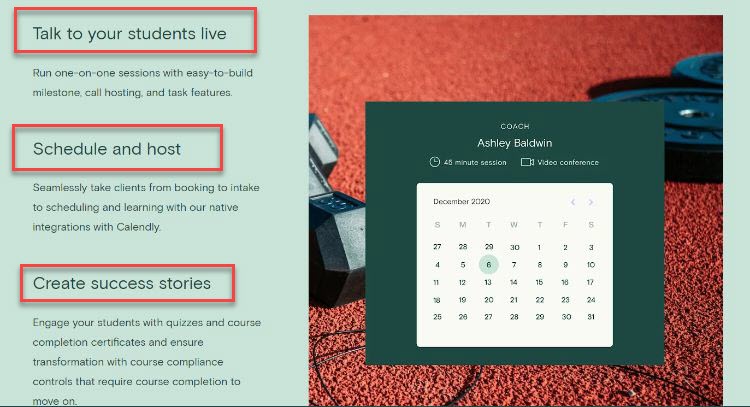
- Live Interaction: Miss the buzz of a live classroom? Schedule and host webinars right from your Teachable account. It’s a great way to connect with your students in real-time, no matter where they are.
- Flexible Scheduling: Juggling a busy life? Teachable helps you find pockets of time to share your knowledge. Teach on your terms, whether that’s at dawn or midnight.
User Experience:
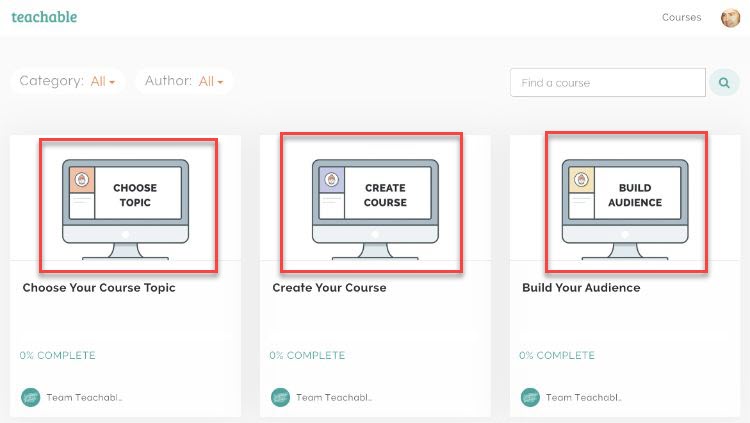
The user experience is excellent on this platform.
You can easily choose your objective, including creating your own course, choosing a topic, or building an audience.
This structured approach makes it simple to follow as you create your course.
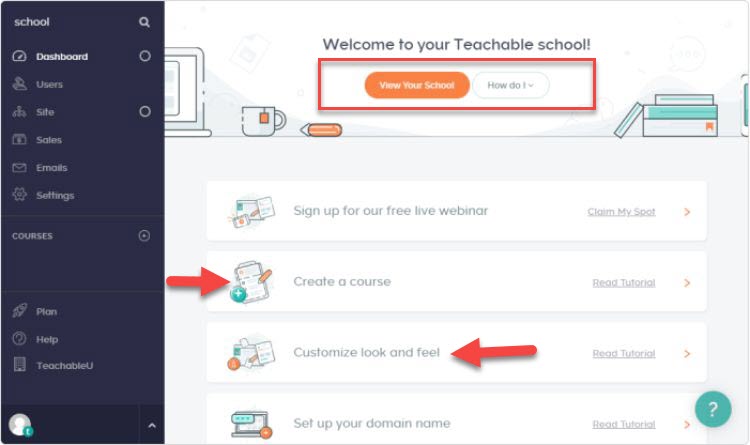
You can also customize the look and feel of your courses with a few clicks.
There are also several tutorials that show you how to use the different theme features on the site.
Teachable Pricing:
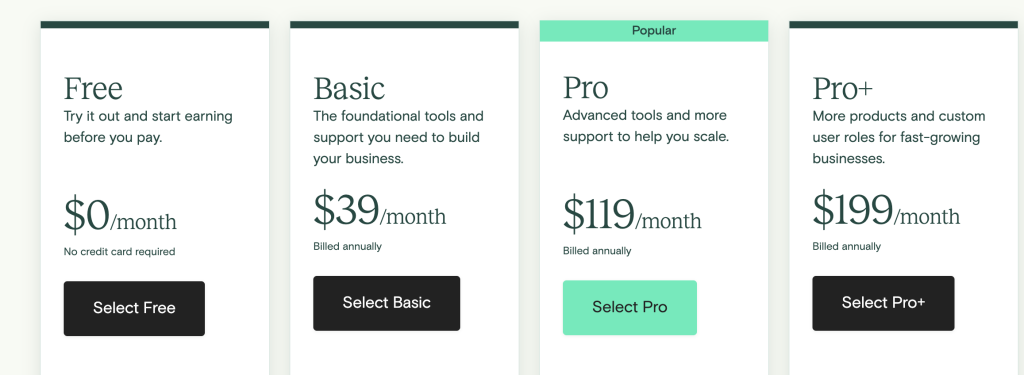
- Free ($0/month)
- Basic ($39/month): 5% transaction fees, 2 admin users, drip content, course builder, members-only community.
- Pro ($119/month): Basic features, plus no transaction fees, 5 admin users, advanced reports, and course certificates.
- Pro ($199/month): More products and custom user roles.
What I Like/Dislike About Teachable:
Like:
- Straightforward setup.
- Unlimited everything – as a coaching platform, it offers unlimited bandwidth, students, courses, and coaching services.
- One-click checkout.
- Optimized storefront and sales pages.
- Live Zoom courses on their pro plan.
- International payment plans in 130+ currencies.
- Graded quizzes.
- Custom course completion certificates.
- Website theme customization.
- They can have 5 user accounts on their pro plan.
Dislike:
- Support for individual cases is not dealt with in the same way as general platform issues.
- Website navigation is difficult to get used to at the start.
Product Updates:
- Course templates called ‘Simple’ and ‘Colossal’ were added to help you quickly create beautiful courses without any design or coding required.
- You can add lead capture forms directly to product pages, allowing you to grow your email list and increase conversions.
- Bundle functionality was added, so you can create a course package and offer it as a one-time purchase or subscription.
Get started with your Teachable Pro Plan and use my promo code PROSOCIATE1MFREE at checkout to get one month free.
5. Podia.
Best For Hosting Communities

Adam’s Take
If you want digital content to sell online, Podia could be a good platform for you. With options like selling courses and downloads, hosting webinars, and building a community, Podia can change based on your needs.
7.8out of 10
Best For
Hosting Communities
Price
$0-$59
Annual Discount
Yes – Save $398/yr
Promotion
Podia is an all-in-one online course platform with over 50,000 members that is great for digital downloads, webinars, and memberships.
Its main types of courses include:
- Standalone courses that include images, video and audio files, MP3x, PDFs, quizzes, and more.
- Pre-sell your course by taking payments before launch.
- Cohort-based courses with a future start date.
- Drip courses deliver your course in a section-by-section format.
- The ability to add coupons and memberships.
They truly excel with their membership options. You can grow your online community by interacting with members, bundling products for specific groups, offering tiered plans, and connecting with Facebook Groups and Slack.
Podia also acts as a webinar platform to host either live or on-demand webinars.
Another excellent feature is the ability to run your affiliate program inside of Podia. You can view all of your affiliates in one place, view helpful reporting, and make payouts based on your customized commission structure.
There is 24/7 support, no transaction fees, and a simple three-step process to get your course website up quickly.
Finally, Podia also offers a free plan, allowing you to use their website builder to create a customizable website with your product.
With their community plan on this free option, you can offer your audience free or paid memberships, which is great to start building your list and selling a digital product.
Key Features:
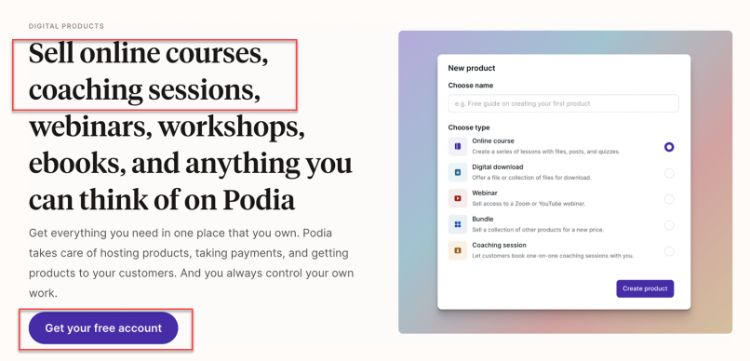
- Drip Courses: Keep your students hooked with content that unfolds like a good TV series. Release lessons over time and watch engagement soar.
- Instant Payouts: No need to wait around for your earnings. Start selling and see the fruits of your labor right away.
- All-in-One Platform: Tired of juggling a dozen different tools? This platform brings everything under one roof. It’s like having a Swiss Army knife for your online course business.
- Audience Connection: Reach out and touch your audience (metaphorically, of course). With email marketing, landing pages, and social media tools at your fingertips, you’re always just a click away from your learners.
- No Transaction Fees: Keep more of what you earn. With no sneaky transaction fees, your profits stay where they belong – in your pocket. It’s refreshing, isn’t it?
User Experience:
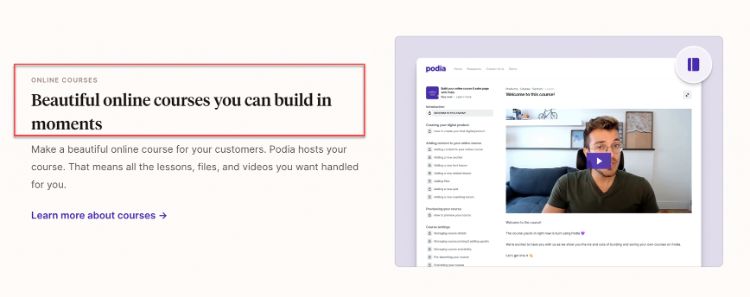
Podia provides a straightforward interface when it comes to creating your courses.
You initially choose between the type of course that includes online courses, digital downloads, webinars, bundles, or coaching sessions.
After, you use their easy-to-understand menu to set up your course content.
The menu system gives you access to the needed features of each course creation stage, including adding text, audio, and video content.
You can also look at your audience, add coupons, look at affiliate and sales stats, and more.
Pricing:
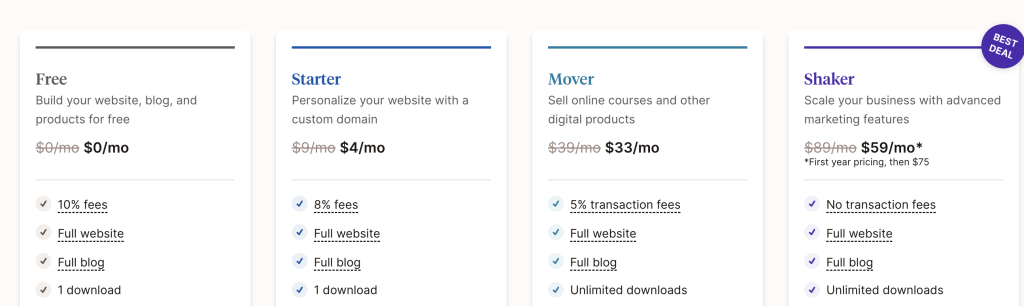
- Free Plan ($0/month) – Sell digital downloads or a coaching/consultation product and build your email list.
- Starter: ($4/month) – Personalized website and custom domain.
- Mover ($33/month) – Unlimited everything, zero transaction fees, sell courses, digital downloads, and 5k emails sent per month.
- Shaker ($75/month) – Everything in Mover, plus the ability to create membership communities, add affiliates, and have 15k emails sent per month.
What I Like/Dislike About Podia:
Like:
- The overall platform design allows for easy use by both those starting out and those with more experience.
- The user interface is simplistic and easy to navigate, making it straightforward for your students to find the courses they are looking for.
- Podia offers excellent value for money when compared to other platforms.
- The platform has been designed with the course developer in mind, making it easy to create and sell your courses.
- Since being launched, they have continually updated the platform with new features.
- Digital downloads are a great way to sell supplementary content to your students.
Dislike:
- The inability to categorize products means students can’t filter products on the storefront page.
- There is no way to add custom embed codes, allowing instructors to embed their courses on their websites/pages.
Product Updates:
- The community search and reporting feature improved, making it easier to search through your content and members. This means that finding and understanding your data is now a breeze.
- The newsletter section allows lead capture to start building your email list immediately.
- The Podia course viewer has been updated with a cleaner design, so your courses look their best.
Overall, suppose you’re looking for solid membership functionality and the ability to increase your sales with the help of affiliates. In that case, Podia is a unique and worthwhile course builder to try out.
You can sign up and give it a test run with their free plan.
6. Skool.
Best Simplified Experience.
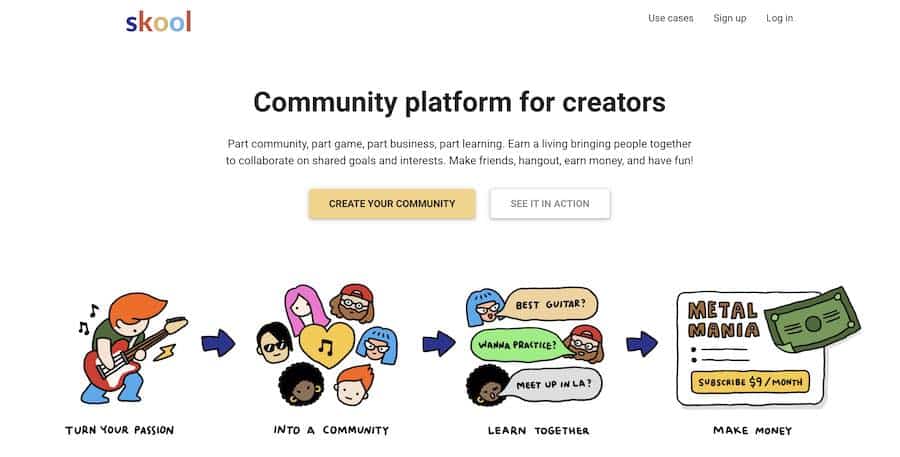
Skool brings everything you need to teach online courses into one easy-to-use platform.
And that’s why this is the platform I use for all my online courses.
With Skool, you can create and sell courses on any topic, build a community, track your student’s progress, and more.
With its user-friendly interface and features, it’s easy to see why Skool has become one of the most popular online course platforms.
Offering much more than a Facebook group when it comes to building a community, Skool has dedicated forums for each course where students can interact with each other and the instructor.
Admins can easily create posts, ask questions through polls, share links and documents, and more.
If you’re looking for a simpler version of any current course platform out there, Skool is worth checking out.
Key Features:
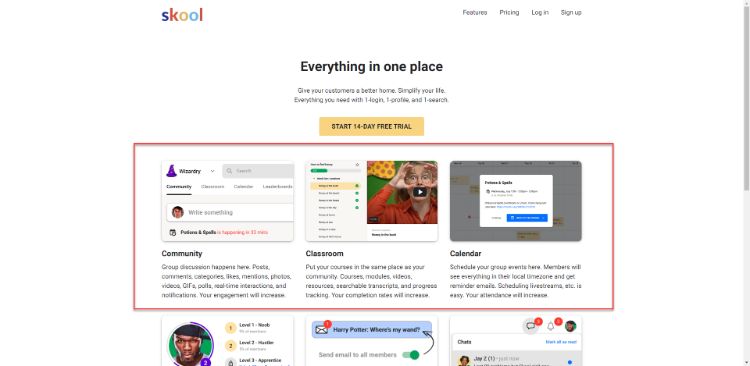
- Community Feature: Imagine having your team’s “clubhouse” right in the platform. Skool’s community feature brings everyone together, making collaboration a breeze.
- Course Creation & Tracking: Got knowledge to share? Skool lets you create courses on just about anything. And keeping tabs on your students’ progress is a piece of cake.
- Calendar Feature: Never miss a beat with the handy calendar. Keep track of upcoming events, deadlines, or even that virtual pizza party you promised your students.
- Email Broadcasts: Need to spread the word? The email broadcast feature lets you update your students faster than you can say “pop quiz.”
- Chat, Notifications, and Profiles: Keeping track of your course community is a breeze. Chat, get notifications, and check profiles all in one place.
User Experience:
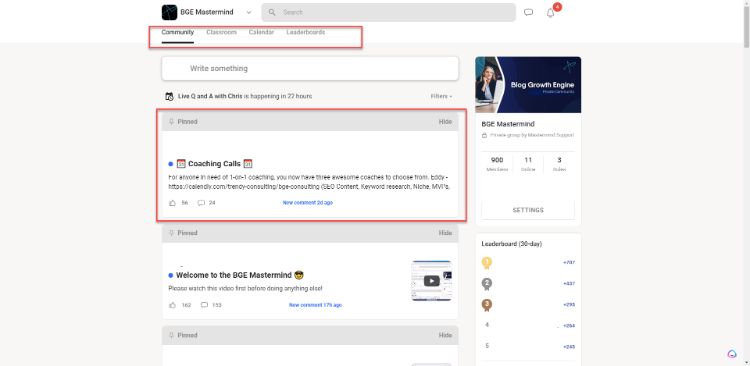
The platform is simple to navigate with the tabs located at the top of the page.
From your community, to the classroom, calendar, and more, everything is easy to find and use.
There are also the latest posts (plus the pinned ones) that show up when you first enter the site, which makes it easy to catch up on what’s been going on.
Pricing:
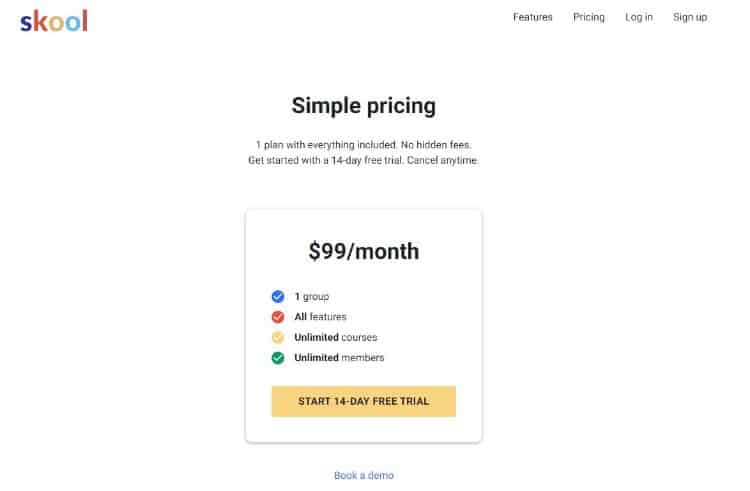
There is a 14 day free trial to get started. After that, there is a simple payment plan of $99/month that gives you access to all the features that Skool has to offer.
You can also book a demo to see if Skool is the right fit for you.
What I Like/Dislike About Skool:
Like:
- Skool is extremely user-friendly and easy to learn, providing an outstanding experience for users.
- A supportive and ever-growing community helps answer any questions you may have.
Dislike:
- Skool does not have its own video hosting capabilities, so you will need to utilize an external solution to host your videos.
Product Updates:
- You can now personalize your group by having custom-level names that are different from the standard “Beginner, Intermediate, and Advanced.”
- You can also provide various course to specific members when they get to a high level in your group.
Check out my Skool vs. Kajabi and Skool vs. Thinkific reviews for more details.
7. Mighty Networks.
Best For Creating Communities.
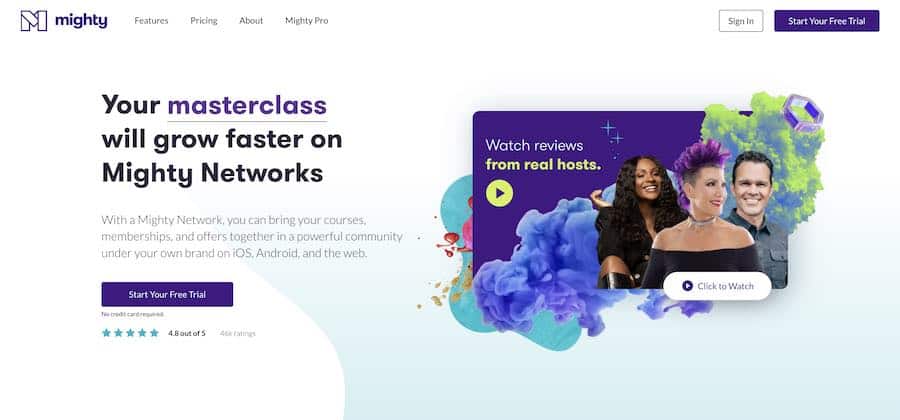
Mighty Networks allows you to build and own your online course, membership site, or the professional network—all in one place.
You can also use it to power your podcast, blog, or even your physical event space.
No matter what type of online course you want to create, Mighty Networks makes it easy to build and grow a thriving community around your course content.
You can also use your social media followers to build your Mighty Network—and reach a whole new audience of potential students.
Key Features:
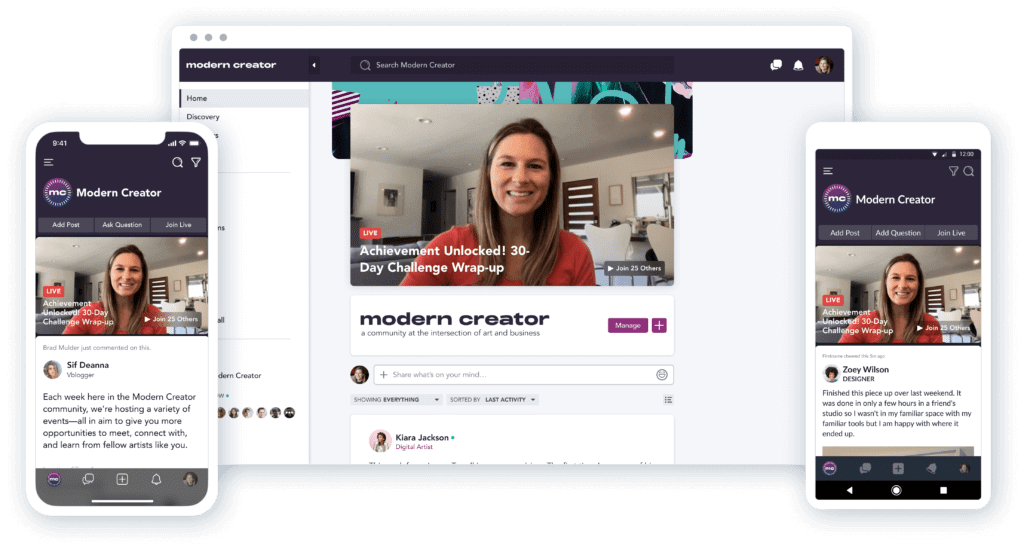
- Live Streaming & Video Uploads: Stream live or upload videos at your leisure. It’s like having your own personal broadcasting studio right at your fingertips.
- Mighty Effect™ Personalization: One size doesn’t fit all, and neither should your content. This clever tech ensures each member sees what matters most to them.
- Welcome & Discovery Sections: First impressions count, right? These sections guide newbies straight to the good stuff. It’s like rolling out a digital red carpet for your fresh-faced learners.
- Unlimited Members: Your network can grow as vast as your ambitions. No artificial caps here – it’s like having an infinitely expandable classroom.
- Custom Branding: Make your space truly yours with custom landing pages and domains. It’s not just a course platform; it’s your digital home sweet home.
User Experience:
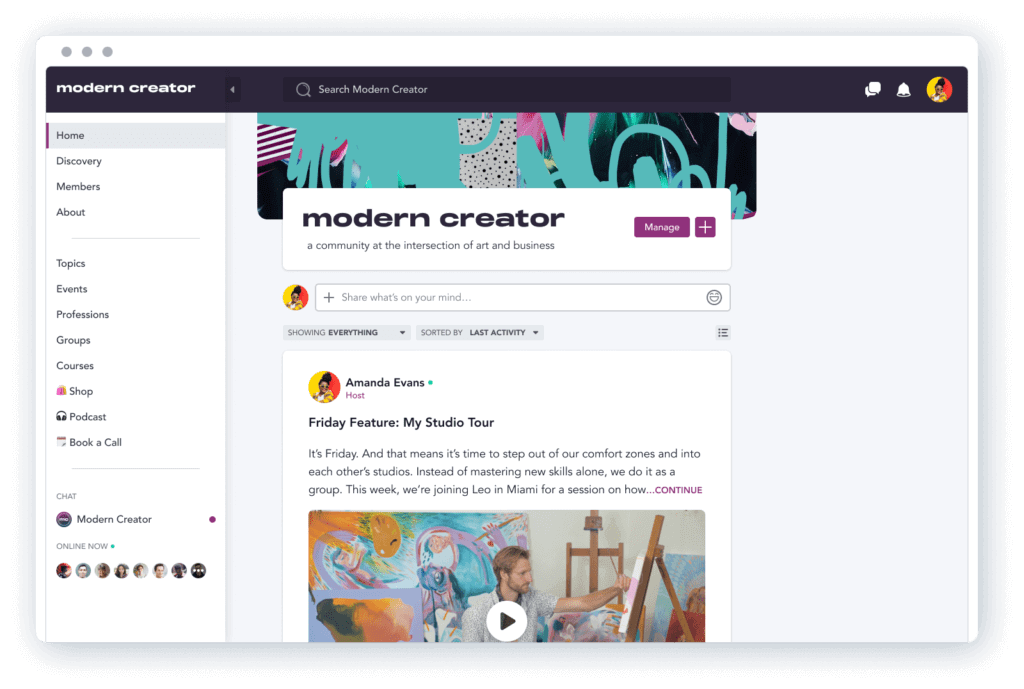
With an easy-to-use desktop and mobile interface, Mighty Networks is one of the most user-friendly online course platforms.
It’s simple to navigate and find the content you’re looking for—whether you’re a community member or an administrator.
Pricing:
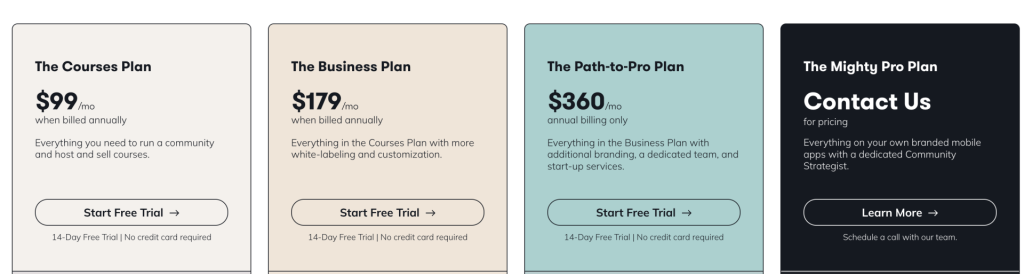
There are three pricing plans for those who want to create their online course on this platform:
- The Courses Plan: $99 per month
- The Business Plan: $179 per month
- The Path-to-Pro Plan: $360 per month
What I Like/Dislike About Mighty Networks
Like:
- Clients can access their course via the mobile app downloaded from the Google Play Store or Apple Store.
- Creating an online system for a remote organization is easy to do.
Dislike:
- Integrating with some external payment systems takes a few clicks to get up and running.
Product Updates:
- Recent improvements to the member account creation flow make it easier for members to sign up for Mighty Network.
8. LearnDash.
Great Online Course Software LMS for WordPress Users
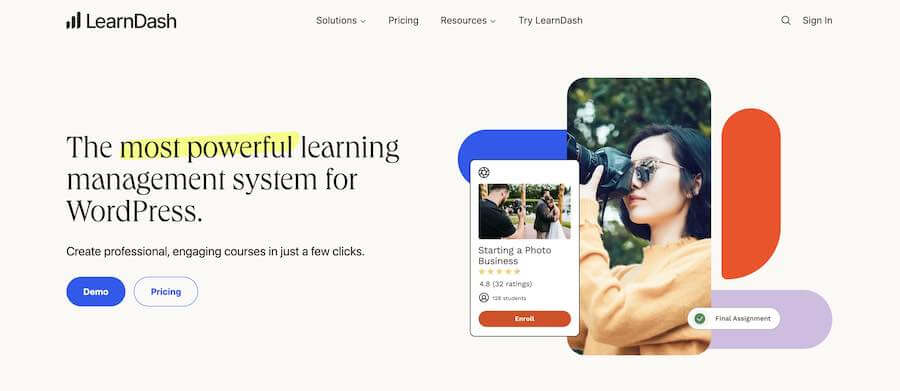
LearnDash is a WordPress plugin and the platform you need to sell courses with a WordPress site.
This popular WordPress LMS plugin is used by some big websites using LearnDash, including Yoast, Infusionsoft, the University of Michigan, and WP Elevation.
One of their first helpful features is their “Focus Mode,” which blocks out all distractions when students run through a course.
LearnDash’s full-featured course builder meshes well with their email drip campaigns. You can build a great online course on your website and match your content with an email drip schedule to send lessons according to a program.
Their Gradebook* technology takes LMS to another level.
This technology gives students an overall grade based on quiz and homework scores, creating a weighted average for teachers to review.
In addition to grading, course points award points for actions, and badges and certificates award students for course activities.
If you’re a teacher looking for grading systems that compete with the features of college curriculums, LearnDash is the best LMS plugin.
You can get started today from $25 per month.
9. Ruzuku.
The Ridiculously Easy Online Course Platform
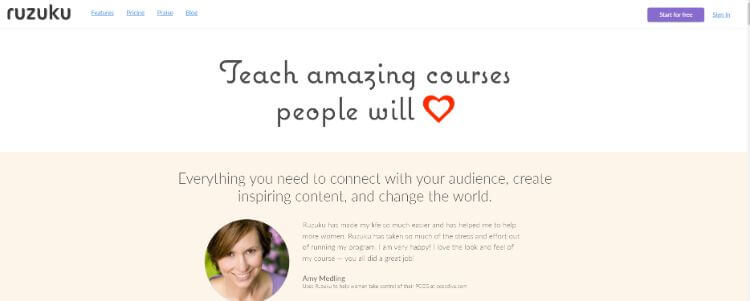
Ruzuku allows you to create a step-by-step online course with their learning platform, PDFs, and text in minutes.
You can quickly create course outlines, edit and reorder your steps easily, launch your course, and generate sales in no time.
Ruzuku integrates with tools like MailChimp, Infusionsoft and payment gateways like Stripe and PayPal to accept payments – and they don’t charge transaction fees.
They’re also known for their desirable community. When you join Ruzuku, you’re not buying a teaching tool; you’re joining a team to help your students learn.
Called “the ridiculously easy course creator,” Ruzuku comes with some excellent features listed below:
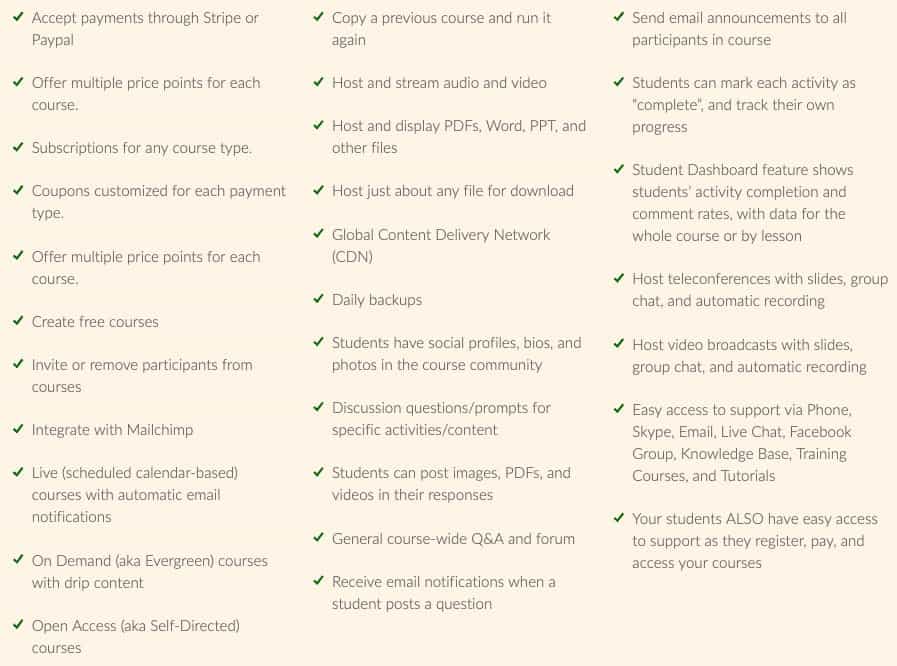
Finally, their platform offers unlimited courses to unlimited students on all paid plans.
You can get started with a 14-day free trial and 30-day money-back guarantee.
10. Academy of Mine.
The Enterprise Online Course Platform Custom-Built to Your Business ($499/month)
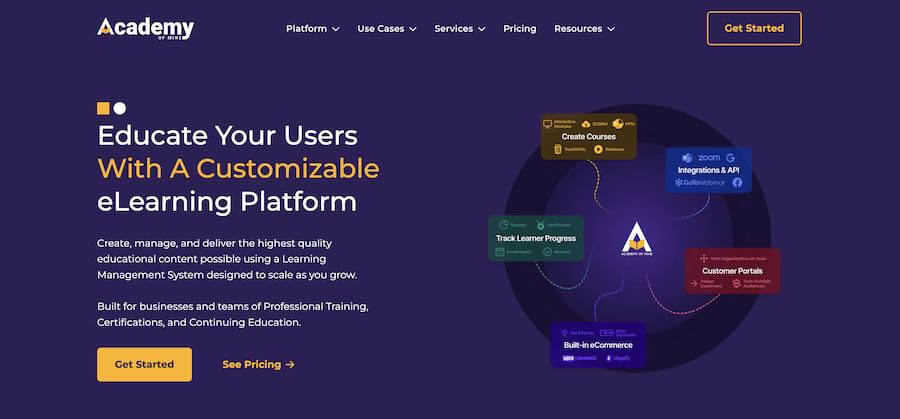
Academy of Mine is a high-end eLearning platform founded on personalized customer success and a philosophy of customization.
It’s truly a learning management system that works best in different business niches.
A standard plan feature is free development hours to help set up and launch your course with customized integrations.
One of their goals is not just to set you up and help you launch. They also want to help sell your course with their marketing tools and analytics dashboards.
Personalization is at the heart of its strategy.
Are you a healthcare company that wants to create a complete curriculum for continuing education credits (CECs)? They can help with that.
Are you an insurance company that requires continued training due to constant changes in a particular legal code at the state level?
Are you looking to create online courses to manage your facility?
That’s also no problem with Academy of Mine.
While these enterprise offerings may be overkill for typical users, they are necessary for small to medium-sized businesses needing a robust training system for their employees or clients.
If this sounds like the eLearning solution you’re looking for, you can get started today with their 30-day free trial.
11. WizIQ.
Affordable Live Virtual Online Classrooms
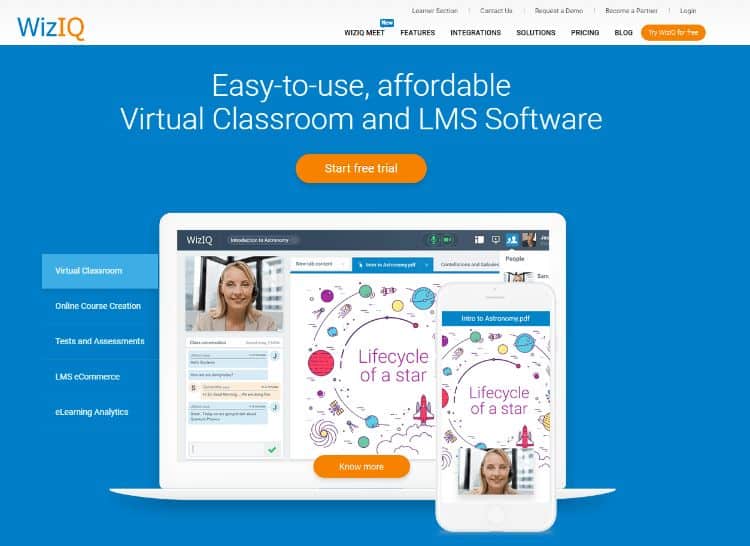
WizIQ offers teachers and educators an easy way to set up virtual classrooms for live interactive online classes.
Over 400,000 instructors have leveraged WizIQ to teach over 4 million students virtual classes across 200 countries.
They provide the latest tools for live training, such as discussion boards, video streaming, mobile options, assessments, and analytics.
If you are an educator or corporate leader that wants to reach your audience live anywhere in the world, you can get started with their 14-day free trial.
What Are Online Course Platforms?
Online course platforms are learning management systems (LMS) that give users access to digital classes.
These virtual courses are similar to offline classes: an instructor provides an engaging educational experience through video, image, text, audio, and PDF files.
Students follow along with the LMS software, take notes, perform exercises, and complete exams to test their knowledge.
Tools like Teachable, Thinkific, Kajabi, Podia, and Ruzuku all feature a robust feature set for course creators.
Course software includes features like a fully responsive website experience, easy content uploading, the ability to edit the look and feel of the class, marketing features, course completion certificates, a sales funnel, and more.
They give you everything you need to sell an online course. Some even allow you to build your course for free.
If you’re an educational institution looking to replace your on-premise classes with online learning, it’s essential to understand the current best learning management systems (LMS).
Course creators choose a platform to use, then charge their students a set fee to access their courses.
What Are the Best Online Learning Platforms?
Now for the student’s point of view.
With social distancing becoming the norm and many colleges moving to online classes, there are plenty of ways to educate yourself from home.
Often called massive open online courses (MOOCs), they differ slightly from paid platforms.
Instead of hosting files yourself, courses are in a marketplace where students pay for them directly or via a subscription.
The benefit for course creators is that you can leverage these websites to reach a new audience. The downside is you won’t earn as much money per sale, and there is stiffer competition in the market.
Ultimately, I recommend using one of the providers above to sell courses.
If you want to sign up for a platform to learn new things, here are my picks for the best online learning platforms.
1. Udemy.
Udemy is one of the best online course platform marketplaces with over 24 million students, 35,000 instructors, and unbelievable 80,000+ courses.
The first step to creating a course is signing up as a premium instructor.
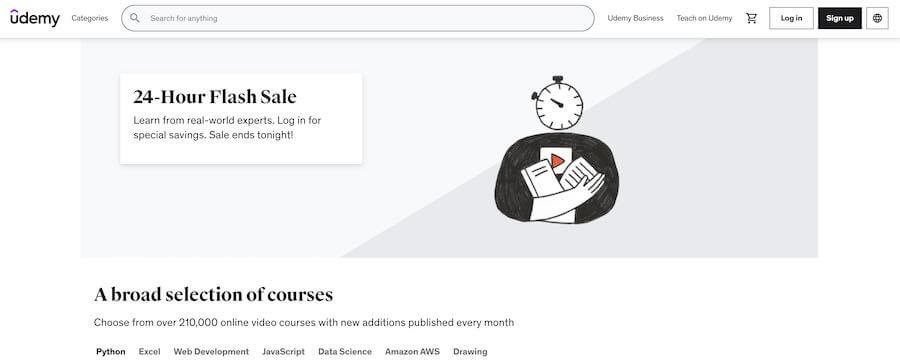
Once your account is approved, it’s effortless to start creating your courses. When creating your video content, remember that the material has to be at least 30 minutes long and contain five lectures.
Another benefit to adding your course on Udemy is that you can easily promote your class inside their platform.
You can use their marketing features to be included in site-wide discounts, be placed in their marketing emails, or join their affiliate program with tiered commission rates.
What does Udemy cost?
It is free to use.
They charge a 3% rev share for sales through instructor coupons, 50% for students who found your course through organic search (SEO), and 75% for transactions made through paid search marketing efforts.
Advantages
Udemy is one of the best online course platforms for professionals.
The first advantage is that you get access to a large user base. Udemy’s 40 million users are all potential students who will pay for your course.
But just because you’re on their platform doesn’t mean you’ll start raking in sales immediately.
You must develop a strong marketing and sales strategy, like a new e-commerce company, author, or real estate agent. It’s all about getting your name out there.
They provide a substantial revenue share for tuition fees.
Instructors set their course prices and receive revenue at 100% of the tuition fee for new users and 50% for existing users.
That’s a substantial commission on sales and a massive benefit to using their platform.
You can participate in their marketing promotions. Every so often, they run promotions that can help you reach a larger audience on their platform.
These marketing promotions are opt-in, so instructors can choose to participate.
They have reliable technology and support. They offer free 24/7 support, and they also have a vast library of helpful articles.
Disadvantages
There is intense competition with other courses.
Instructors are at the mercy of the placement and appearance on the Udemy website, which is controlled by their proprietary algorithms.
If you’re new to the platform, it can be difficult to outrank other instructors on particular topics.
There is also stiff competition with other course publishers. Udemy isn’t the only course marketplace ranking on search engines for your course topics.
Other marketplaces like iSpring Learn, LinkedIn Learning, Coursera, and Skillshare can compete with Udemy in organic search, which can disadvantage instructors.
They have lenient return policies.
Refunds are guaranteed to all students within 30 days for any reason.
Because of this, students could take a course, complete it within 30 days, and get a guaranteed refund – decreasing their sales.
Udemy Review: Final Verdict
First, they’re one of the most well-known, widely used, and professional online course marketplaces out there.
With a robust rev share model, a vast audience to tap into, 24/7 support, and marketing offerings, you can’t go wrong with their platform.
Although there is healthy competition with other course creators and platforms, the company will likely maintain its lead in the market.
Get started with Udemy for free today.
2. Shaw Academy.
Shaw Academy is a platform that gives its students access to professional, accredited online courses. Students sign up for Shaw Academy and get access to all of their long-form courses.
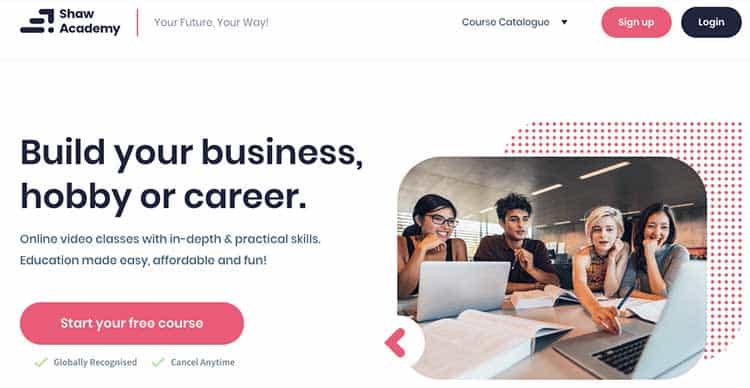
They offer courses in three distinct categories: for hobbyists, professionals, and entrepreneurs.
For example, their “For Professionals” category offers a globally-recognized Digital Marketing Course. This course includes 32 videos and takes an average of 16 weeks to complete.

What Does Shaw Academy Cost?
Courses are offered for free for the first four weeks.
You can then continue learning by paying for a monthly plan.
The cost then ranges from $49.99 to $60 per month.
Shaw Academy Pros
Their courses are all globally recognized and offer certifications to help your career. If you’re a working professional, their classes on digital marketing, project management, web development, Photoshop, and Microsoft Excel are very in-depth.
Entrepreneurs can also access helpful classes on social media marketing, viral marketing, wedding, photography, etc.
Their courses are all flexible, and you can complete them based on your schedule.
They also offer helpful support and the ability to download class recordings to watch them offline.
The four-week free plan is also a great bonus too.
Shaw Academy Cons
Although they offer many good courses, you may not find the right one depending on your industry.
They also don’t have the same volume of hobby classes as platforms like Skillshare.
Shaw Academy Review: Final Verdict.
If you’re a professional looking for flexible, accredited courses that you can start entirely free for four weeks, this platform is a great choice.
3. Skillshare.
Skillshare is a large marketplace focused on creative education. Topics include anything from graphic design and music production to fine art and cooking.
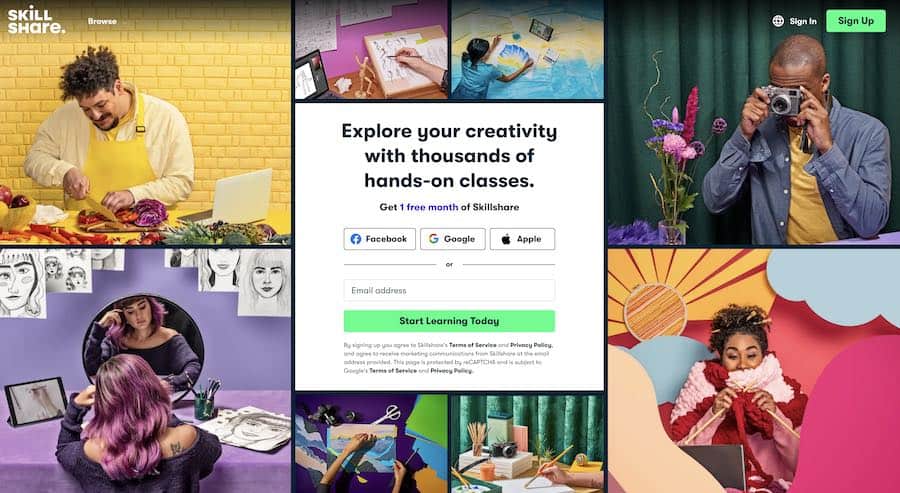
They also have classes on more technical topics like data science, analytics, and e-commerce. Skillshare has over 5 million users and has paid over $5 million to teachers.
Each class is 20-60 minutes broken down into shorter lessons, plus projects and a community discussion forum to connect with other students.
The open discussion is very beneficial for their creative topics, as students can share their progress and get feedback from others.
They also can help premium members with production and course planning and can even help with online course creation at their studio in New York.
What does Skillshare cost?
It is free for creating a premium course experience. They pay instructors $10 for paid membership referrals and monthly royalties for each minute of content watched.
Advantages
They have a large user base of creators and entrepreneurs.
If you offer content that suits a creative audience, Skillshare is a great platform to get noticed.
Lessons on web design, building your email list, photography, painting, personal branding, and creative topics are the most popular.
The quality of the classes is reliable.
They pride themselves on professional, high-quality courses. They can help outline your course based on the needs of their audience and can also assist with production.
Disadvantages
Earnings run through a royalty system. Each month, between 30 and 50% of Skillshare’s premium subscription revenue goes to a royalty pool for teachers.
The remaining funds go to marketing and promoting classes, supporting the platform, and running day-to-day operations. This royalty system works for well-established teachers, as the more minutes watched, the more revenue share you receive.
However, this makes it difficult for new instructors to receive much compensation when they’re just starting. Plus, students who watch at 2x speed only count as half the minutes toward the royalty pool.
Another disadvantage is they only offer email support. Although they have helped support articles, the only option to contact them is via email.
Skillshare Review: Final Verdict
Skillshare is an up-and-coming online course marketplace with over 4 million students. With a large user base of creators and entrepreneurs, it is an excellent option for instructors in creative fields.
Their classes are all high quality, and they can help ensure that your class will best match the needs of their audience for maximum impact.
However, based on the royalty system for earnings, and no live support, you may be able to make many more sales with a marketplace.
If you’re a creative course creator and want to reach a new audience, their online courses are worth a try.
Sign up with Skillshare and get two months of free classes.
4. LinkedIn Learning.
LinkedIn Learning (formerly Lynda) is another online course marketplace tailored to business professionals.
With over 1,000 business courses on project management, web development, and digital marketing, they’re an excellent platform for working professionals looking to keep their skills up-to-date.
They also offer certifications that you can add to your LinkedIn profile, showcasing your expertise and improving your online resume.
What does LinkedIn Learning cost?
Monthly fees tie to a premium LinkedIn membership, which is $29.99/month or $24.00/month if you pay annually.
Try LinkedIn Learning today and get one month free.
5. Treehouse.
Treehouse is a relatively new marketplace that believes in the democratization of education.
Their platform is “committed to making education accessible to students of all races, genders, sexual orientations, and socio-economic backgrounds.”
They feature 300+ technical courses on coding and development, over 50,000 students, and over 27,545 minutes of video (and counting).
Treehouse partners with big names, including Microsoft, IBM Watson, Amazon Alexa, and Google Developers.
What does Treehouse cost?
Treehouse offers a 7-day free trial. Then you can choose from three monthly plans ranging from $25 to $199.
Their basic plan features on-demand courses, interactive practice sessions, and access to their online community.
The pro plan gives you access to bonuses, beta features, and downloadable content.
And if you’re looking to create a real portfolio and get job-ready skills, their Techdegree plan gives you personalized feedback, real-time support, and a custom curriculum.
Try Treehouse today.
6. Coursera.
Coursera is a professional online course marketplace with virtual classes from some of the world’s best companies and universities, like the University of Michigan, Duke, and Stanford.
Instructors teach Coursera courses at some of the world’s top universities, which take about 4-6 weeks to complete, and include video lectures, peer-reviewed assignments, and community discussion forums.
What does Coursera cost?
Coursera is free to join, and you must be logged in to see pricing information on individual courses. There are three tiers of class offerings at Coursera.
- Main courses cost $29-99/month. These take the standard 4-6 weeks to complete, and you receive an electronic course certificate upon completion.
- Specialization courses are for mastering a specific career skill and cost between $39-79 per month. In these online courses, you tackle real business challenges with hands-on projects and more rigorous coursework.
- Online degree programs. If you’re looking for more advanced education, you can even participate in university-recognized online degree programs. These take 1-3 years to complete and cost anywhere from $15 to $25,000.
Give Coursera a try.
Other top platforms to take courses include ALISON and General Assembly.
How Do I Create and Sell Online Courses?
The first step to selling online courses is to start with your end goal in mind and work backward.
How will you transform your students’ lives, and how will they be different once they’ve completed your course?
You should start your course by planning the transformation your students will achieve.
To understand what your students want to learn, hang out in forums related to your topic, and look at the top questions people are asking. Quora is an excellent place for this.
Once you understand how to solve your student’s problems, create a clearly defined learning path to guide them to a predetermined goal.
During each stage of the course journey, make their outcomes clear.
By setting a learning path and clearly defined end goal, your students will stay more engaged and active with your content.
Here are the top 10 ways to create and sell online courses.
1. Figure Out the Cost of Developing Your Online Course.
The cost to develop your learning platform depends on many factors, including depth of content development, research and analytics expenses, and marketing. Studies estimate that a professional online course can cost between $5,850 and $15,600 to produce.
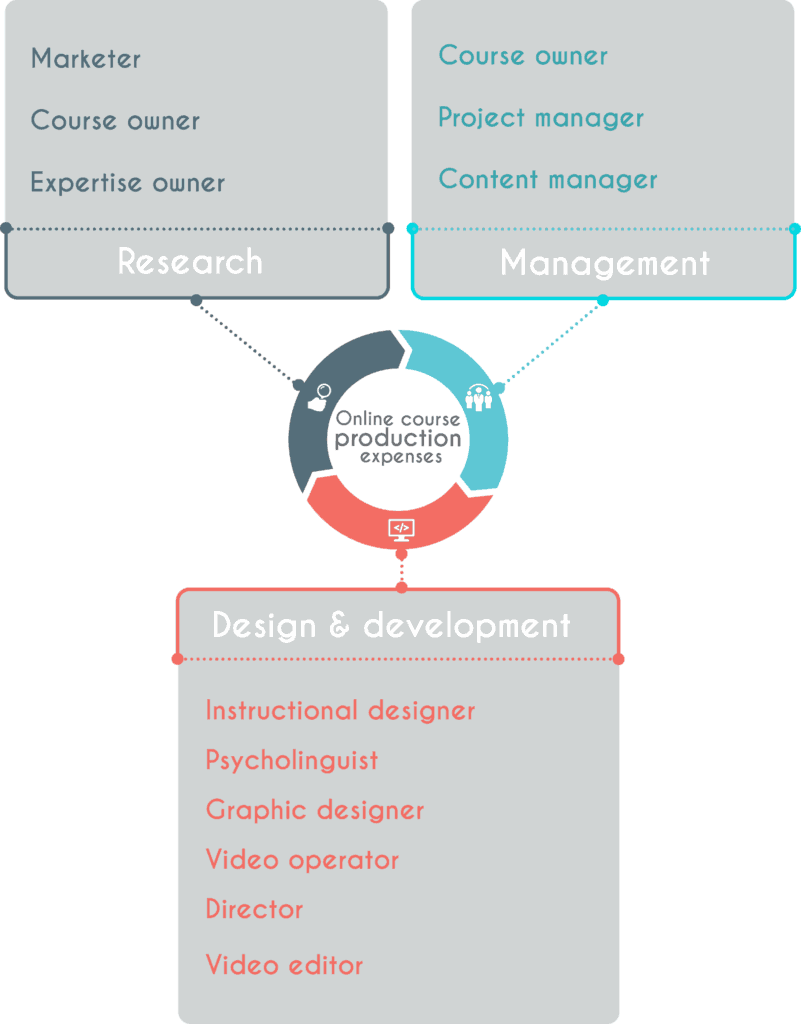
However, that’s a pretty high estimate, including professional video development, paying a subject matter expert (SME) to teach the course, market research, email automation or webinar software, and promoting the course. Source: racoongang.com
It can be much cheaper if you’re starting and want to create a course yourself.
For example, if you have a quality webcam, a microphone, screen-sharing tools, and video editing software, you can create a course for under $200.
Your most significant investment is time.
Keep in mind that online course costs rise with your effort.
The more effort you put into analyzing your audience, market research, creating an outline, and shooting professional media with an engaging instructor, the higher the cost.
2. Use the Best Software and Equipment.
Creating a course isn’t as simple as adding a webinar to a website. You need to produce the course first!
Software and equipment are required to create high-quality content.
Remember, you’re replacing an in-classroom experience with a virtual course, so it needs to look professional.

However, you don’t need the most expensive, high-end equipment to get started – but you will need a few essential items.
1. Microphones
Microphones are crucial. Bad audio is much easier to detect than shaky video, and you need a quality microphone for your course to sound excellent.
Use the best microphone you can afford. You can use a standard receiver, lavaliere mics, or a headset, but I recommend a USB microphone.
One of my favorites is the Blue Yeti. And don’t forget to get some microphone accessories to improve your audio quality further. Pop filters, foam balls, shock mounts, and acoustic panels are critical if you’re recording in a small room.
2. Headphones

A good set of noise-canceling headphones will help tremendously during the editing process. They also come in handy when conducting interviews and recording someone.
3. Screen recording program
If you’re creating a class on a software or computer program, you’ll have to show the screen to highlight your work. There are many options for screen recording software, but one of my favorites is Screencast-o-matic.
4. USB Webcam
Mostly all online courses will require live webinars or videos of an instructor for a personal classroom feel.
Recording equipment can include something as simple as your iPhone, a webcam, or a run-up to professional DSLR camcorders.
The most significant factor is your budget.
5. Audio and video editing software
Once you’re done shooting your course, the real magic happens with editing.
My favorite options include Apple Final Cut Pro and Adobe Premiere Pro.
If you’re looking to spruce up your animations, try Adobe After Effects.
6. Lighting and accessories
Quality three-point lighting is crucial to ensure your instructor shines (pun intended).
You can purchase a complete studio light set or only some accessories for your iPhone.
Either way, you’ll want to research interview lighting techniques to certify you look professional.
3. Create Valuable Content.
This one is a no-brainer and is a common denominator when comparing online vs. classroom learning.
You need a detailed vision of who your ideal students are and what they are interested in learning.
Do they want to develop a new skill and earn an online certificate? Do they want to help grow their own business?
Understanding your audience’s pain points can create a vision for your course.
Create compelling video courses.
Use video plus interactive worksheets, PDFs, quizzes, and other elements to engage with your students on a deeper level.
Also, make sure to condense learning into shorter sentences – no one wants to read long paragraphs.
4. Differentiate Your Website.
Focus on your niche and provide the absolute best content with a focus on your unique value proposition (UVP). Unless you want to become the next EdX, you must specialize and be the best at an exceptionally focused niche.
Offer an exclusive hook statement and differentiate your course’s UVP out of the gate.
Ask yourself: What makes my course different than the rest?
For example, if your niche is graphic design, don’t create a course called “Graphic Design for Beginners.” That’s too broad.
A class called “Adobe InDesign for Ebook Publishers” is more focused and more natural to market.
Don’t focus on too many different areas.
Your online course should have one focal point and not stray away from it or go off-topic. You diversify into other topics after you see some initial success with your teachings.
5. Take Time to Market Your Business.
After pouring all of your hard work into creating your course, your job is just getting started. Now you need to market it.
You need a dedicated website.
You need a professional web presence to help people find you and view you as an expert in your field.
Your website should have an active blog with content related to your niche, which is search engine optimization (SEO) optimized.
Build a social media following.
Create your own Facebook Business page to engage with your community. Share your latest updates on Twitter and Instagram.
Having a regular post schedule and providing engaging social media content will help build a community behind your brand.
6. Have Control Over Your Brand.
Branding an online course platform is essential for any organization looking to offer courses and other educational content.
By branding the platform, your organization can create a unique identity that will help differentiate it from competing platforms, as well as attract potential customers.
The first step in branding an online course platform is to create a clear mission statement and vision.
This should define the course’s purpose, what topics are covered, why those topics are essential for learners, and who the target audience is.
The mission should be more than just a slogan; it needs to provide direction and purpose for the platform to communicate its value proposition effectively.
Once you have established your mission statement, it’s time to design the look of your platform.
This includes visuals such as logos, colors, fonts, images, and videos that will help create an attractive visual brand for your online courses.
Designing with these elements in mind will ensure that anyone accessing your courses has a positive experience from start to finish.
It’s also essential to consider how users interact with your platform when they access their courses or search for new ones.
Simplifying navigation can make it easier for learners to find what they need quickly and seamlessly move between coursework sections.
Additionally, establishing user guidelines and policies can help set expectations around privacy and security issues related to using the platform.
Finally, you’ll want to look into marketing options that can help promote your online course platform.
This could include creating promotional materials such as flyers or posters or investing in digital campaigns like pay-per-click advertising or targeted email campaigns.
7. Deliver an Exceptional Learning Experience.
The platform should deliver a great learning experience.
You should include multiple content types like audio, text, documents, and more.
Other features to look for include creating quizzes and sending completion certificates, forums, and “drip” courses sent to students over time.
8. Integrate with Other Tools.
Choose a platform that integrates well with other solutions.
You will want to ensure your learning platform can work with other tools like email marketing services, analytics solutions, and more.
Check for popular integrations with tools like MailChimp, Google Analytics, WordPress, and more.
For example, if you started a blog and are selling courses with a WordPress site, you need to choose a platform that can easily integrate into your current website.
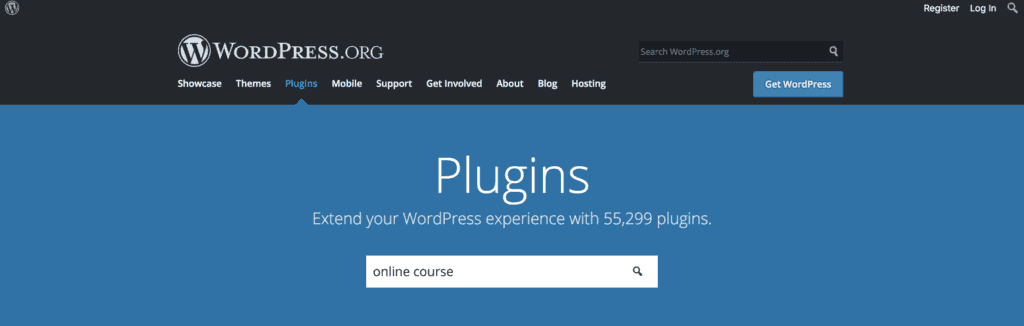
If you do want to create an online course business with WordPress, you can search their plugin directory for a list of the right plugins:
9. Align Sales with Your Budget in Mind.
The platform should fit your budget and offer flexible pricing options. To make money selling online courses, you need to spend money.
But by looking into pricing information first, you better understand your potential return on investment.
You should also be on the lookout to see if any platforms charge a hidden transaction fee on your course sales.
When creating your online course and choosing an online learning platform, most paid plans remove heavy transaction fees.
10. Leverage Customer Support if You Need It.
The platform should offer excellent customer support and training.
Many services offer free resources and training, a dedicated account manager, and a helpful instructor community that can help you succeed.
Use those resources if you’re stuck – don’t be afraid to ask for help.
Summary and Top Picks
When choosing between the best online course platforms, remember to do your research: consider the student experience, marketing features, and pricing.
The best online course platforms let you easily upload your content, provide training for your students, and generate course sales.
All offer course creation tools and features for online teaching.
Ultimately, the critical factor is you.
The success of your course and the ability to sell courses online is based on the quality of your content and how well you can market yourself.
A platform is just that, a platform.
Yes, it’s a branded, engaging, interactive piece of media with your insights and experience, but it still needs planning, market research, development, and, most importantly, marketing.
Here are my final top picks:
- Thinkific: Best Overall Online Course Platform.
- Kajabi: Best for Professionals.
- Learnworlds: Best for Students.
- Teachable: Best For Beginners.
With all of the high-end features you need at the most affordable price, Thinkific is the clear overall winner.
Ultimately, with endless topics to teach and millions of students ready to learn from you, why not get started today?
If you’re ready to start creating and selling online courses, I recommend you go with Thinkific.
Editorial Process:
Our reviews are made by a team of experts before being written and come from real-world experience. Read our editorial process here.
Some of the links in this article may be affiliate links, which can provide compensation to us at no cost to you if you decide to purchase a paid plan. These are products we’ve personally used and stand behind.